Updated: 2026-09-08 15:52 ET · Reached by signing out and opening the Home tab
(also reachable via the Page Readiness screen's Page Banner test — render / tap / dismiss (Mock)
row, which opens the same /alpa route)
TLDR: 3 checks covering the signed-out /alpa landing:
it paints instantly with no loading skeleton, and — with Diagnostic Mode on — offers an on-demand
"New content" refresh pill so the update-available affordance can be demonstrated without waiting on the
live backend to actually change.
Checks 2 and 3 need Diagnostic Mode on (Settings → tap the version number, bottom-right,
5 times). Check 1 needs it off. Enabling/disabling the toggle and the rest of Settings' DIAGNOSTICS
section (Environment, Refresh Auth Token, Throw Test Exception) has its own walkthrough — not repeated
here.
Heads up: a fresh Debug install has come up with Diagnostic Mode already ON out of the box
in this round of testing — check Settings before assuming Check 1's "no pill" baseline is broken.
Checks
1 · Instant paint, no skeleton, no pill
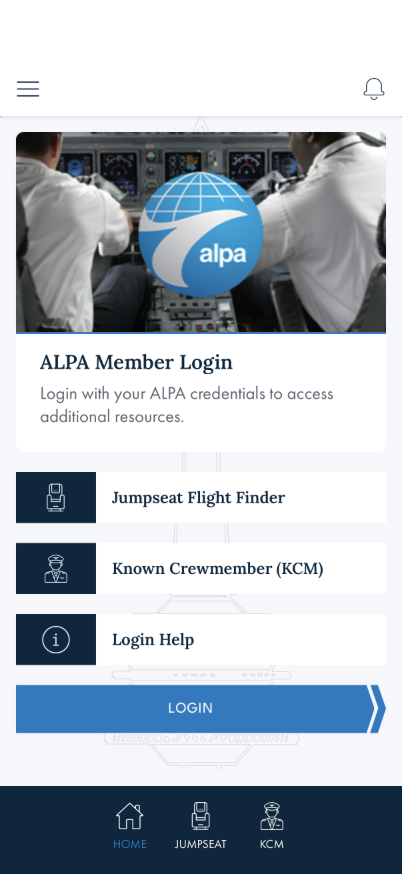
Steps: With Diagnostic Mode off, sign out if needed, then open the Home tab.
What you should see: The ALPA globe hero, the ALPA Member Login card, Jumpseat
Flight Finder, Known Crewmember (KCM), Login Help, and the blue LOGIN button —
all present on the very first frame, with no loading spinner or placeholder skeleton beforehand. No
refresh pill appears.
Something's wrong if: A loading skeleton or blank placeholder shows before the
content appears, even briefly.
Note: a "New content" pill appearing here even with Diagnostic Mode off is not
necessarily a bug — it means the live gateway is now genuinely serving something different from the
bundled fallback content. That path isn't scripted in this walkthrough (see Known gaps); if you see it,
just note what changed rather than treating it as a failure of this check.
2 · Diagnostic Mode showcases the refresh pill
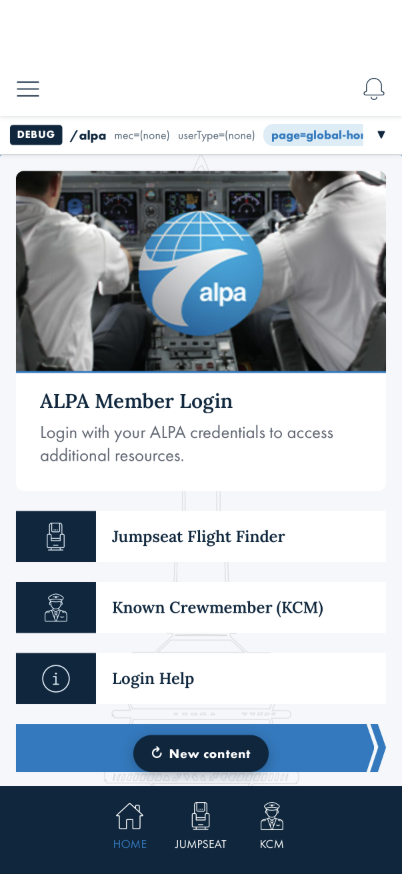
Steps: Turn on Diagnostic Mode (see Prerequisites), then open the Home tab while
signed out. Wait a couple of seconds.
What you should see: The same instant paint as Check 1, then — about a second or two later — a
dark ↻ New content pill appears above the tab bar.
Something's wrong if: The pill never appears after several seconds with
Diagnostic Mode on, or it appears instantly with no delay at all.
3 · Applying the pill swaps in new content
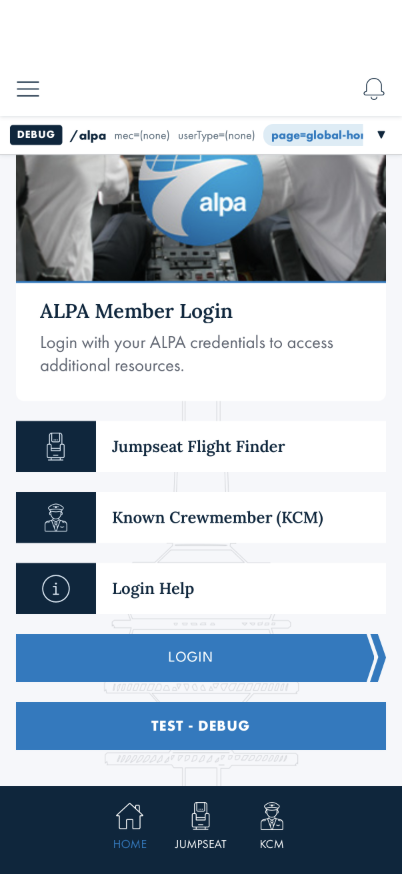
Steps: Tap the ↻ New content pill from Check 2, then scroll down past the LOGIN
button.
What you should see: A brief skeleton flash, then the page re-renders with a new TEST -
DEBUG button directly under LOGIN that wasn't there before — proof the swap actually applied. The
pill is gone afterward.
Something's wrong if: The pill disappears but no new content shows up, the page
goes blank, or the skeleton flash never resolves back to content.
What this checks, overall
Signed-out /alpa never blocks its first paint on a network round trip, and the
"update available" pill affordance can be reliably demonstrated on demand (via Diagnostic Mode) instead of
depending on the live backend actually having new content to offer.
What's not covered yet
The genuine live-content-changed pill — the same affordance can in principle appear from the
real background fetch alone, independent of Diagnostic Mode, if the live gateway's global
site content actually differs from the bundled fixture. That isn't scripted here since it depends on
live backend state at the time of testing, not something a tester can reliably trigger on demand.
Diagnostic Mode itself — the 5-tap toggle gesture and the rest of Settings' DIAGNOSTICS
section (Environment, Refresh Auth Token, Throw Test Exception) get their own walkthrough; not
duplicated here.
Session/sign-in interaction — what happens if a member signs in while sitting on this screen,
or while the pill is showing, isn't walked here (see the Login & Logout walkthrough).