Updated: 2026-09-08 16:13 ET · No dedicated Page Readiness row — reached via
Profile — pilot info / settings / log out (/profile) → Settings
(/settings)
TLDR: Settings has a hidden Diagnostics group,
gated behind tapping the version number 5 times. It's the prerequisite for every other
diagnostic-only Settings feature (Toggle Environment, Refresh Auth Token, Throw Test
Exception) — including the Refresh Auth Token
walkthrough. Not a security boundary, just discoverability: no PIN, no confirmation,
toggling it back off hides the group again immediately.
Before you start
Logged in — Settings sits behind Profile, which requires a session.
Diagnostic Mode is a persisted device setting, not per-session: if you (or a prior
tester on this device) already turned it on, the Diagnostics group is already visible and
Check 2's 5-tap gesture has nothing to reveal. Turn it off first (Check 3) if you want to
walk the reveal from a clean state.
Checks
1 · Reach Settings
Steps: Tap the person icon (top-right of the top nav bar) to open Profile,
then tap the Settings row.
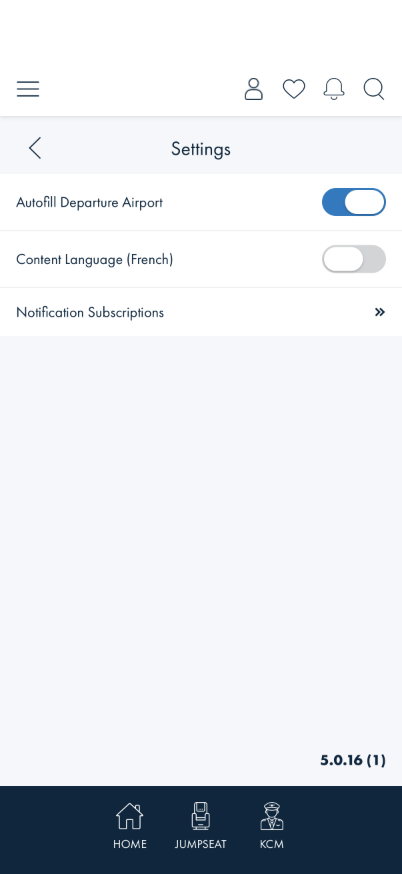
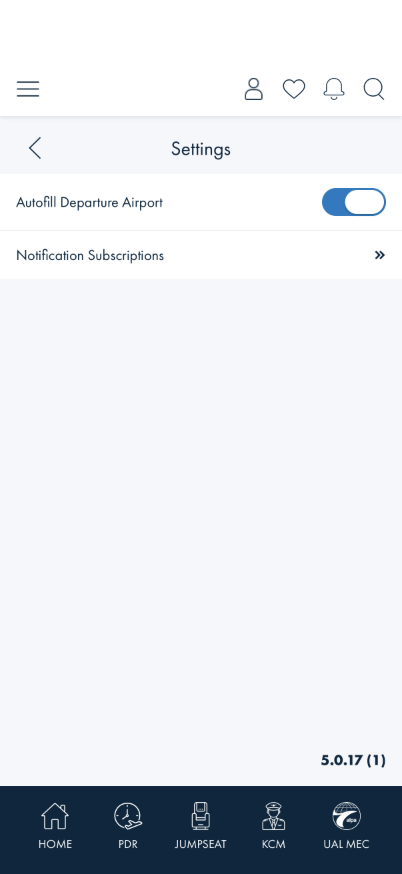
What you should see: A plain Settings screen — Autofill Departure Airport
toggle, optionally Content Language (French), Notification Subscriptions, and
the version number (e.g. 5.0.16 (1)) pinned above the tab bar. No DIAGNOSTICS
group.
Something's wrong if: A DIAGNOSTICS group is already visible on a
device that has never had this walkthrough run on it before — Diagnostic Mode should
default off.
2 · Reveal Diagnostics
Steps: Tap the version number at the bottom of the Settings screen 5 times, within
about 3 seconds of each other.
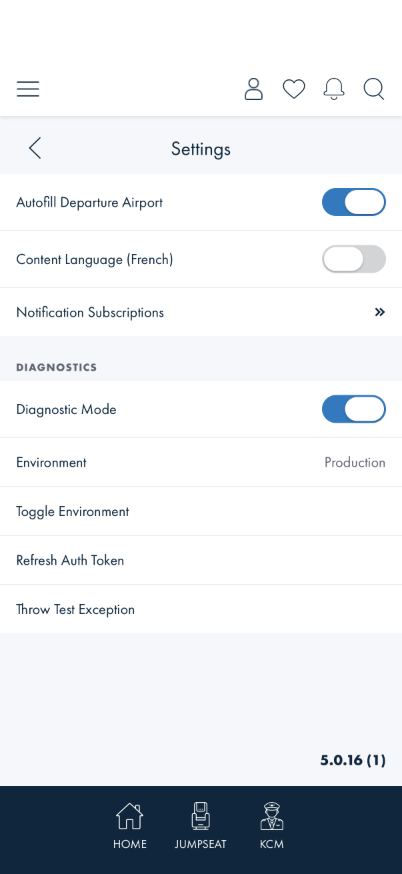
What you should see: A snackbar confirming Diagnostic Mode On, and a new
DIAGNOSTICS group appears above the version number with four rows: Diagnostic
Mode (a toggle, already on), Environment (read-only, reads Production
on a normal build), Toggle Environment, Refresh Auth Token, and Throw Test
Exception.
Something's wrong if: Tapping fewer than 5 times reveals it, tapping
5 times spread out over a long pause (walk away and come back) still counts toward the same
5, or the group doesn't appear at all after 5 quick taps.
Note: a tap more than ~3 seconds after the previous one resets the
count to 1 rather than continuing to accumulate — so 3 taps, a long pause, then 3 more taps
should NOT reveal it (that's 3, not 6, from the gesture's point of view).
3 · Hide it again
Steps: Tap the Diagnostic Mode toggle itself (not the version number).
What you should see: A snackbar confirming Diagnostic Mode Off, and the
whole DIAGNOSTICS group (all four rows) disappears immediately — not just the toggle
switching state with the other rows left behind.
Something's wrong if: The group stays visible after toggling off, or
only some of the four rows disappear.
Note: this is a persisted device setting (survives an app restart),
not a per-session flag — leaving it on for the rest of a testing session is fine and won't
affect other testers unless they share the same device/simulator.
What this checks, overall
The one gesture every other diagnostic-only Settings feature depends on: that it's
correctly hidden by default, reveals reliably on exactly 5 quick taps (not fewer, not spread
out), and hides again cleanly when turned off.
What's not covered yet
Toggle Environment and Throw Test Exception — the other two rows this
gesture reveals aren't walked here. Refresh Auth Token has its own
dedicated walkthrough.
Android — walked on iOS Simulator only; the tap-counting gesture has no
platform-specific code, but hasn't been separately confirmed on Android.