Updated: 2026-09-08 16:13 ET · No dedicated Page Readiness row — reached via
Diagnostic Mode → Settings
(/settings) → Refresh Auth Token
TLDR: A blocking modal that re-authenticates with
your stored credentials, then holds you on screen while CacheContentService
re-fetches everything (document catalog, member data, MEC/LEC content, notifications — 14+
API calls across two waves), showing each one's live status. Exists because a re-mint picks
up whatever server-side context (e.g. portal impersonation) is attached to your account at
that moment — see Background. A ✕ lets you leave early once sign-in
itself has finished; the refresh keeps running unattended either way.
Before you start
Logged in, with a real password on file — this re-authenticates with
stored credentials (username/password), not the current session token. If none are
stored, the modal shows "No stored credentials found" and exits immediately (not walked
here as its own scenario — straightforward to reproduce by testing on an account that
signed in via a passwordless/SSO path if one exists, otherwise treat as untested).
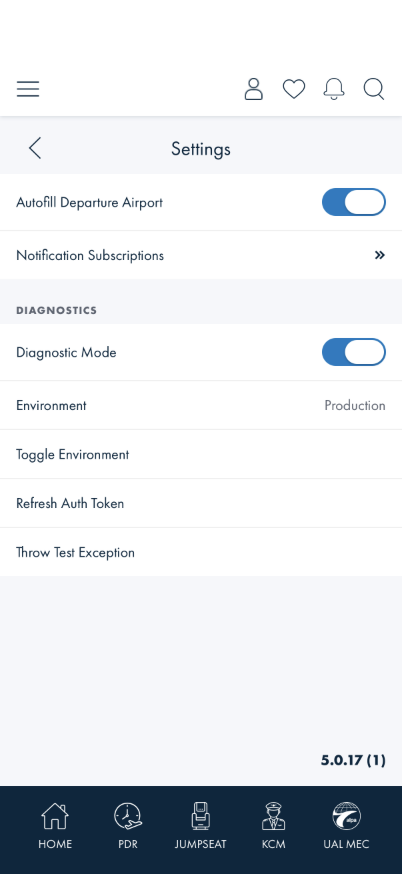
Diagnostic Mode must already be on to see the
Refresh Auth Token row.
Expect this to take 15–55+ seconds end to end (live timing from repeated runs) — the
slowest single call is consistently the document-list fetch.
Checks
1 · Start the refresh
Steps: On Settings, under DIAGNOSTICS, tap Refresh Auth Token.
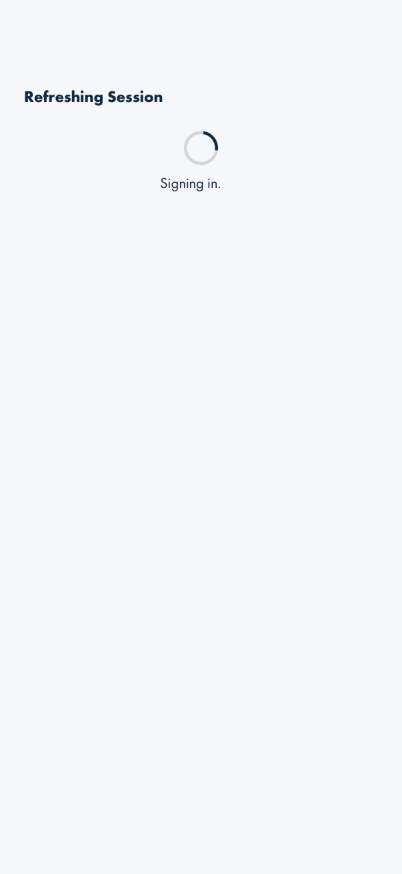
What you should see: A full-screen modal titled Refreshing Session appears
immediately, with a spinner and the label Signing out then Signing in (these
two stages are fast — often under a second each, easy to miss). No ✕ is visible yet, and
nothing behind the modal is reachable.
Something's wrong if: The Settings screen behind the modal is still
tappable, or a ✕ is visible during Signing out/Signing in.
2 · Identity and live endpoint list
Steps: Keep watching after sign-in completes.
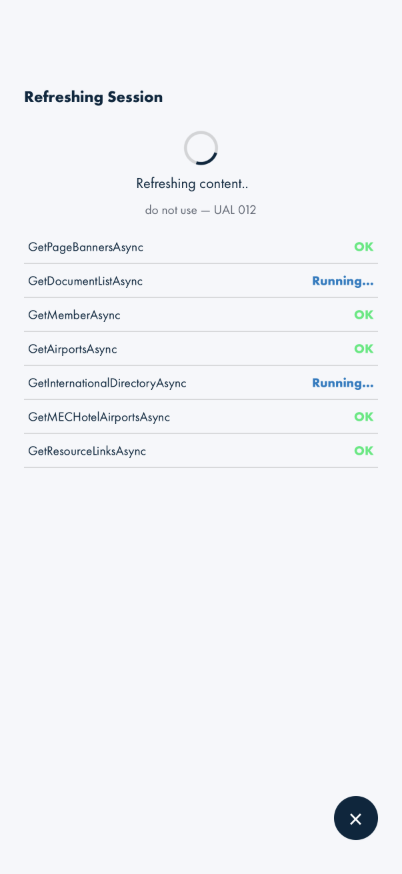
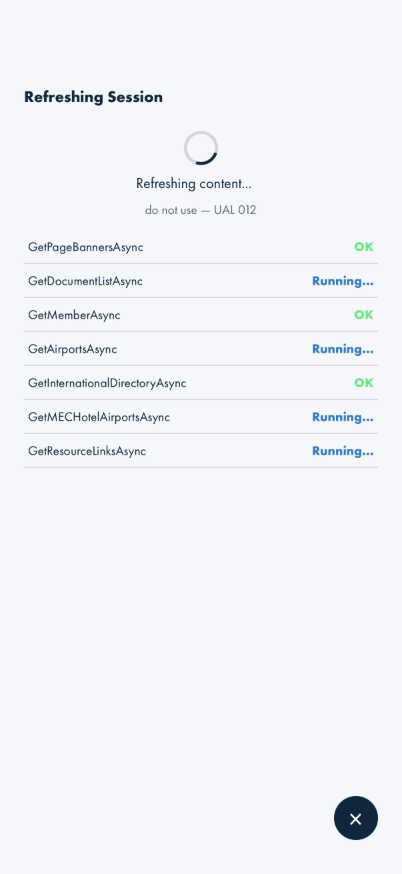
What you should see: The label changes to Refreshing content, a line appears
underneath naming the account the token now belongs to (name and MEC/LEC, e.g.
do not use — UAL 012), and a scrolling list of API call names appears below —
each showing Pending, Running…, OK, or Failed, updating live. The
list fills in two batches (7 rows, pause, 7 more) rather than all at once — that's the real
sequence (a login-critical wave fully finishes before the bulk-content wave starts), not a
rendering bug.
Something's wrong if: A row's status never changes from
Pending/Running… even after the whole modal has dismissed, or the identity line
is blank/wrong for the account that's actually signed in.
3 · Exit early with the ✕
Steps: While still on Refreshing content (endpoint list visible, some rows
still Running…), tap the ✕ in the lower right.
✕ available — some endpoints still running
Immediately back to normal Settings
What you should see: The modal closes immediately — you're back on a fully
interactable Settings screen, Refresh Auth Token re-enabled with its normal label.
A snackbar reads "Auth token refreshed — content is still loading in the background."
Something's wrong if: Tapping ✕ does nothing, freezes the screen, or
the modal reappears on its own afterward.
Note: tapping ✕ only stops the modal from waiting on you — it does
not cancel the actual refresh. Give it another 15–30 seconds, then check the pilot card on
your MEC home screen or re-open Documents; the content should be current for the identity
named in Check 2, confirming the background work really did finish (there's no visible "now
it's done" indicator once the modal is gone — this is the only way to confirm it from the
UI).
4 · Let it finish on its own
Steps: Repeat Check 1, but this time don't tap ✕ — wait for every row in the
endpoint list to reach a final state.
What you should see: Once every row reads OK (or one reads Failed,
which is possible on a genuinely bad call, not just slow), the label changes to Done,
a snackbar reads "Auth token has been refreshed.", and after roughly a second the modal
dismisses itself — no tap needed.
Something's wrong if: The modal never dismisses on its own even
though every row shows OK — expected to give up after 60 seconds of waiting past
sign-in as a safety valve if something hangs, so let it sit for a full minute before calling
this a failure.
Background — why this exists
A member's session token is minted fresh at sign-in time, and whatever server-side context
is attached to the account at that moment (e.g. a support portal's impersonation state) rides
along in it. Re-authenticating with the same stored credentials — which is all this button
does — re-mints the token and picks up whatever that context currently is, without the member
re-typing a password. The endpoint list and the wait exist because a token re-mint alone isn't
the whole story: the on-device content cache (documents, MEC/LEC data, notifications) is
populated separately and can take 15–55+ seconds to catch up to the new token, and nothing
else in the app currently re-renders once that catch-up finishes on its own — see AB#2693.
What this checks, overall
The full manual re-auth cycle: sign-out/sign-in against stored credentials, the identity
and per-endpoint progress surfaced live, the early-exit ✕ correctly detaching the UI without
touching the background work, and the modal's own two ways of ending (self-dismiss on success,
✕ on request) both leaving Settings in a normal, usable state.
What's not covered yet
The 60-second safety-valve timeout itself — not practical to force live (would
need a genuinely hung network call); behavior after it fires is the same code path as
Check 3's manual ✕, which is walked.
A failed step (red "Failed" row) — not reproduced here; would need a live backend
error on one specific call.