XAML → Blazor Coverage Map
Why this needs a model, not a list
The obvious way to audit Blazor coverage is to line up native page names against Blazor routes and call the leftovers gaps. That method over-reports. It was tried first here and produced ten gaps; on inspection three of them were already built.
The reason is architectural: Blazor routinely expresses a native page as an inline expander or a modal. Those have no route and often no matching name, so both name-matching and route-matching miss them entirely — and they are invisible to anyone auditing from a file listing rather than reading the markup.
The three-state model
Every native page lands in exactly one state. Use these labels when adding to this map.
28 + 9 + 8 = 45, plus 10 infrastructure files that are not screens (base classes, the two Blazor hosts, generic PDF/Web viewers, dev demos and scaffold stubs) = 55. Nothing is unclassified.
This map answers “does a Blazor surface exist?” — not “is it finished?” State 1 means a Blazor route covers the screen. It does not mean the page is production-complete, feed-driven, or navigable. Much of the Blazor surface is still the scaffold it was built as, and a scaffold renders convincingly enough to pass a route check.
MemberResourcesPage was the worked example at this map's 2026-08-03 audit. It
was routed, it rendered four rows matching the Figma frame, and it was a mock
scaffold: the rows came from a hardcoded TileDefs array rather than
the menu feed, and every row was built with Link = "/member-resources" —
linking back to the page it is on, so nothing navigated. That finding is now
stale: as of build 34737cb4 (verified live 2026-08-12) the four rows
link to live routes and all four destinations render. The gap has changed shape, not
closed — each destination was built without a design source. See
Member Resources Destinations —
Design Gap. Tracked as AB#2403.
Assume other State 1 entries may be scaffolds too. Maturity was not assessed
per page here and cannot be read off this table. Before planning against any row, open the
file and check whether it is driven by real data and whether its links resolve. The
Mock/Live pins in ScaffoldDataSourceRouters.cs answer a different
question — which data source a router uses — and a page can be pinned live and still be a
scaffold layout.
State 3 — the eight real gaps
These are the only native screens with no Blazor implementation in any form.
| Native page | What it is | Derivable design? | Evidence it is absent |
|---|---|---|---|
InCaseOfAccidentPage | Member Resources destination | Yes — derive No per-screen frame, but the Member Resources list frame plus existing card and detail patterns are enough. |
Since built. At the 2026-08-03 audit each appeared in Blazor only as a tile label in MemberResourcesPage.razor; as of build 34737cb4 (2026-08-12) all four have live /member-resources/… routes, verified rendering. The remaining gap is design source, not implementation — see Member Resources Destinations — Design Gap. |
InternationalDirectoryPage | Member Resources destination | ||
MembershipCardPage | Member Resources destination | ||
OrangeCardPage | Member Resources destination | ||
PilotGroupCommitteDetailsPage | MEC committee detail | Yes — derive | /mec/committees has no expander, no modal and no drill-down route. |
ContactsHomePage | Contacts landing | Yes — derive | No Blazor contacts surface. /mec/reps renders officer rows with a mailto link — a contacts treatment, but MEC officers only. The category-driven directory has no equivalent in any form. Partial coverage, not absent-by-oversight. |
ContactsCategoryPage | Contacts category list | ||
ContactsPage | Contacts list |
The four Member Resources destinations are the sharpest case. Look at the
four rows in the Figma member resources frame (4870:10671): In Case of Emergency,
International Directory, Membership Card, Orange Card. Those are exactly the four native
pages above. And in MemberResourcesPage.razor every row is built with
Link = "/member-resources" — each row linked back to the page it was
on. The list rendered correctly and every row was a dead end, because none of its
destinations existed yet.
Superseded 2026-08-12: in build 34737cb4 the four rows
navigate to live routes and all four destinations render. What remains is the design gap —
every one was built with no Figma frame behind it, per
Member Resources Destinations —
Design Gap.
State 2 — re-expressed as a non-page view
Built, and easy to mistake for gaps. Each row below was verified by reading the markup.
| Native page | Blazor treatment | Evidence |
|---|---|---|
JumpseatFlightFinderDetailsPage |
Inline .alpa-fcard-detail expander in FlightCard, plus a dedicated
JumpseatFlightDetailPage (/jumpseat/flight-detail) for tapped flight alerts |
Two treatments, split by entry point (D66). From the results
list the detail renders inline on Vm.IsExpanded behind a View/Close Details toggle. From a
tapped push alert it gets its own screen — the same FlightCard at ExpandLocked
(held open, no chevron), addressed by schedule key, with FindFlightInfoAsync refreshing on
landing, pull and app resume. The native page's own refresh parity lives there. |
JumpseatFlightFinderResultsFiltersPage |
D41 Sort & Filter modal inside /jumpseat/results |
_filterSortOpen renders .alpa-form-modal with Sort/Filter tabs and an applied-count badge. Built from Figma 4450:11374. |
JumpseatInfoPage |
Four-tab sub-nav on /jumpseat/search |
_subNavTabs in JumpseatSearchPage.razor. Deliberately a fixed set. The feed-driven custom-item capability is not to be added here — it is attributed to the missing Jumpseat home page and stays an open gap (AB#2402). See below. |
FTDTAugmentedDutyPeriodPageFTDTUnAugmentedDutyPeriodPageFTDTSplitDutyPeriodPageFTDTCADutyPeriodDetailsPageFTDTDutyDetailsPage
|
Variant branches inside /ftdt/add-duty-period and /ftdt/edit-duty-period |
One form branches on duty-period type — “Variant-specific inputs: CA UnAug flags, CA/US Aug crew, Reserve RAP”, Vm.Dp is IDutyPeriod_UnAugmented, plus a CA-parity exceptions block. Five native pages, one Blazor route. A deliberate consolidation. |
Re-expressed does not always mean equivalent. The Jumpseat sub-nav is the cautionary case, and it needs stating precisely so it is not “fixed” the wrong way.
Natively the Jumpseat Info list is built from the menu feed —
MenuItem.SpecialCode is the correlation key, MenuItem.Path names the
destination, and the parent's child Items supply the rows — so comms can add
entries through the API with no app release. The Blazor sub-nav is a fixed four-item array
and does not read the feed, which is why the native list's fifth entry
(Alaska Reciprocal List) does not appear.
That capability is not to be wired into the sub-nav. The sub-nav is section navigation and stays a fixed set; feed-driven custom items belong to the Jumpseat home page, which is where the pattern is attributed and which does not exist in Blazor. The capability therefore stays an open gap, carried by AB#2402 and the cross-cutting ask AB#2404, pending design direction on the home page. Adding custom items to the tab strip in the meantime would put them on the wrong surface and pre-empt that decision.
The general lesson still holds: when classifying something as State 2, check whether the treatment preserves the original's capabilities, not just its content — and if it does not, record where the capability should live rather than assuming it belongs on the replacement.
Cross-cutting: API-driven custom list items
This is not a Jumpseat quirk. Every major native list page is built from the menu
feed, using the same convention: look up a root MenuItem by
SpecialCode, then render its child Items (filtered on
Visible). Comms can therefore add, hide or reorder entries on any of these lists
through the API, with no app release.
| Native list | SpecialCode | Blazor today |
|---|---|---|
JumpseatInfoPageViewModel | JumpseatInfo | No list surface — re-expressed as a fixed sub-nav (State 2) |
MemberResourcesPageViewModel | MemberResources | Mock scaffold with a hardcoded TileDefs array (AB#2403) |
MyPilotGroupPageViewModel | MyPilotGroup | /mec — feed binding not verified |
KCMHomePageViewModel | KCM, KCMUsageProcedures | /kcm — feed binding not verified |
AdvocacyViewModel | Advocacy, AdvocacyShowPACContributions, AdvocacySubmitMeetingReport | /advocacy — feed binding not verified |
SettingsPageViewModel | Settings | /settings — hardcoded two-row list (State 1, AB#2541), not feed-bound |
Blazor already has the routing half of this: MenuTabBarSource.SpecialCodeRoutes
and ShortcutCatalogService map menu SpecialCodes to Blazor routes, with a fallback
that normalises an unknown menu Path. That map should be reused rather
than rebuilt — but it currently bridges four root destinations for the tab bar and
shortcuts only. Nothing in Blazor uses the feed to drive list contents.
Ask for comms and design — AB#2404
Before any of these lists are implemented, we need a decision — otherwise each one gets built to a different assumption and the capability is restored unevenly.
- Which lists should accept custom items in Blazor? All six, or only some? This is a content-operations question as much as a design one: it decides where comms can publish without a release.
- What should a custom item look like? The Figma list frames show a fixed set of rows with a leading visual. A feed-supplied item may arrive with no artwork and a title of arbitrary length — design needs to rule on the row's appearance in that case.
- What happens to an item with no Blazor destination? The feed expresses destinations as MAUI Shell page routes. If comms publishes an item pointing at a page Blazor does not have, the options are: hide it, show it disabled, or fall back to a native page. Today it would silently not render.
- Should ordering and visibility be feed-controlled (native honours
Visibleand sort order), or fixed in the app? - Jumpseat specifically: the sub-nav is section navigation and is deliberately a fixed set. Custom items are attributed to the missing Jumpseat home page (AB#2402). Confirm that reading before that page is built.
Until this is answered the capability stays an open gap on every list above. That is a deliberate hold, not an oversight — wiring feed items into whichever surface happens to exist would pre-empt the decision and scatter the pattern.
State 1 — equivalent page
| Native page | Blazor route | Note |
|---|---|---|
AdvocacyPage | /advocacy | |
DocumentsListPage | /documents | |
DocumentCenterPage | /documents | Same route with no category param renders the scope's category list. |
HomePage | /home | |
HomePageSettingsPage | /customize-nav | |
LoginPage | /login | |
UserProfilePage | /profile | |
MemberResourcesPage | /member-resources | Page exists; fidelity gaps tracked as AB#2403. Its rows were dead ends at the 2026-08-03 audit; as of build 34737cb4 (2026-08-12) they navigate to four live destinations — see the design-gap doc. |
PushNotificationsListPage | /notifications | |
PushNotificationsSettingsPage | /notifications/settings | |
SettingsPage | /settings | Own screen as of AB#2541 — previously re-expressed as a section inside /profile (see the cross-cutting table below). Diagnostics-group actions needing a MAUI-only capability (Clipboard, Permissions, MetroLog, FTDTDataSyncHelper, INotificationHubService, IRestService) have no Blazor port yet; Diagnostic Mode, Environment and Refresh Auth Token are ported since ISettingsService/IAuthentication already expose them to the RCL. |
JumpseatFlightFinderSearchPage | /jumpseat/search | |
JumpseatFlightFinderResultsPage | /jumpseat/results | |
JumpseatFlightFinderSavedFlightsPage | /jumpseat/saved | |
JumpseatFlightFinderFrequentSearchesPage | /jumpseat/recent | |
JumpseatAirlinePolicyPage | /jumpseat/airline-policy | |
JumpseatEtiquettePage | /jumpseat/etiquette | Built AB#2177. No Figma source — see the design-gap doc. |
JumpseatMissionPage | /jumpseat/mission | Built AB#2177. No Figma source — see the design-gap doc. |
KCMHomePage | /kcm | |
KCMAirlinesPage | /kcm/airlines | |
KCMAirportsPage | /kcm/airports | |
KCMAirportDetailsPage | /kcm/airport | |
MyPilotGroupPage | /mec | |
PilotGroupCommitteePage | /mec/committees | |
PilotGroupEventsPage | /mec/events | |
PilotGroupHotelsPage | /mec/hotels | |
PilotGroupRepresentativesPage | /mec/reps | |
FTDTFlightDutyPeriodListPage | /ftdt/dashboard | |
FTDTOperationTypeSelectionPage | /ftdt/select-op-type |
Not screens (10)
Excluded from the model. BannerPage, BasePage and
FTDTDutyPeriodBasePage are base classes; BlazorDevPage and
BlazorHomePage host the Blazor surface; PDFJSPage and
AuthenticatedWebViewPage (AB#2591, replaced WebViewPage) are generic
viewers invoked with content rather than screens in their own right; IconThemingDemoPage,
NewPage and MainPage are dev demos and scaffold stubs.
Footnote on the two viewers: live navigation on 2026-08-12 (build
34737cb4) from the Documents list to the United Pilot Contract (UPA23.3,
fileId 60106) opened WebViewPage (since renamed
AuthenticatedWebViewPage) — the AutoLogin WebView rendering
the cached PDF — not PDFJSPage. Parity comparisons for
/document-open should target AuthenticatedWebViewPage on that path; see
Document Viewer (document-open) —
Design Gap.
Blazor surfaces with no native counterpart
Coverage runs both ways. These exist only in Blazor, so parity with XAML is not the whole
target: /favorites, /search, /comms,
/jumpseat/saved-searches,
/login/non-members, /notifications/flight/{id},
/item-unavailable, plus the tester surfaces (/empty-states,
the three test-scenarios pages and the readiness board at /).
Reference captures
Native captures for the two screens built under AB#2177 are already in this suite, alongside their Blazor counterparts, in Jumpseat Etiquette & Mission — Design Gap.
Native — Etiquette
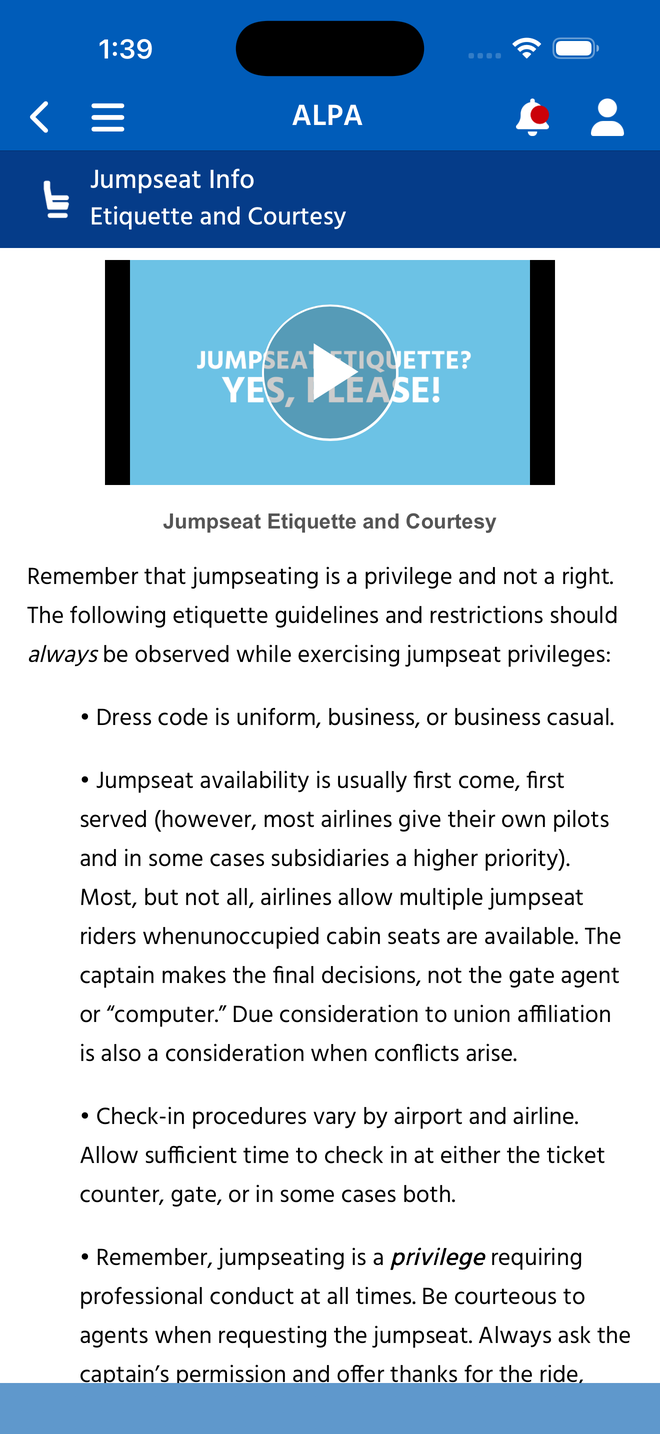
BannerPage + WebView. Pillarboxed iframe, Word-export copy at a fixed size.
Native — Mission
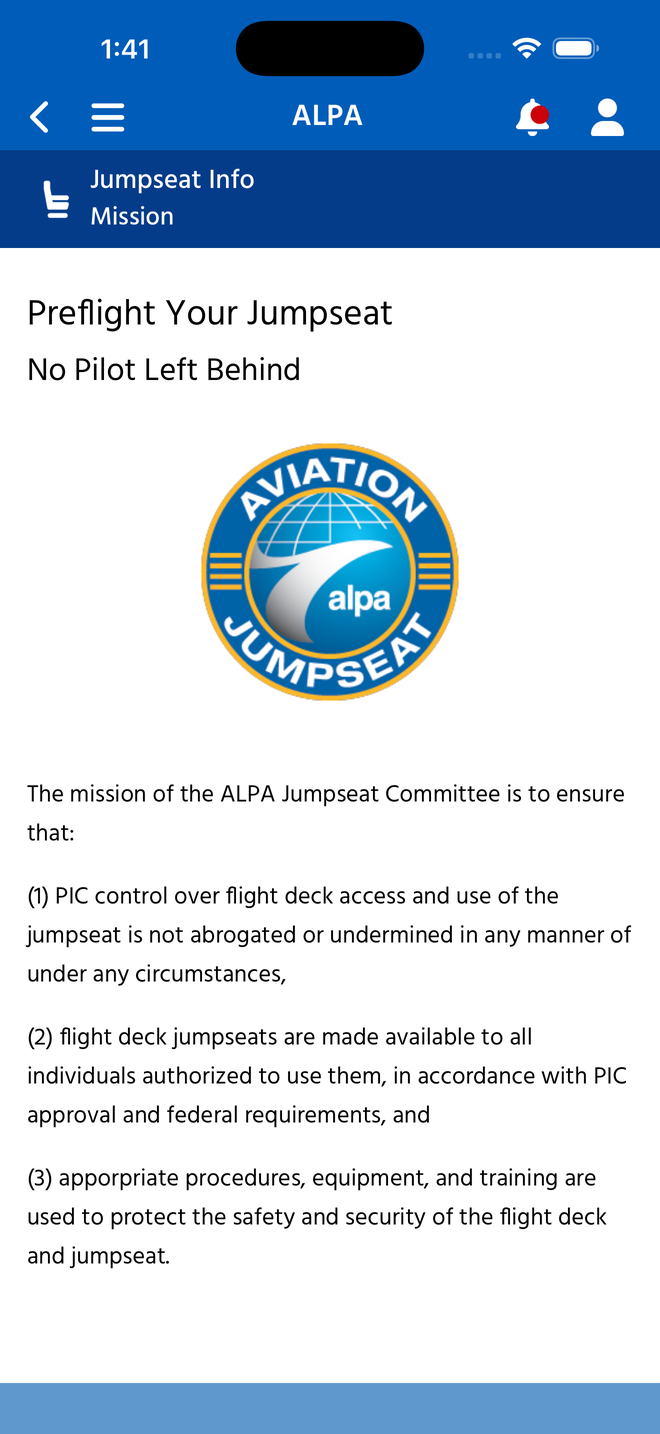
BannerPage + WebView. Hand-numbered mission points; two typos visible in the shipped copy.
The four Member Resources destinations (built 2026-08-12; native references below)
All four are XAML-bound native screens, not external launchers — the native
list navigates them with Shell.Current.GoToAsync(menuItem.Path). Captured from a
signed-in session; OrangeCardPage hosts a WebView but over locally
converted HTML, so it is an in-app screen too. These captures were taken while the four were
State 3; since build 34737cb4 they have live Blazor counterparts, compared side
by side in Member Resources
Destinations — Design Gap. The images below remain the native reference set.
In Case Of Accident
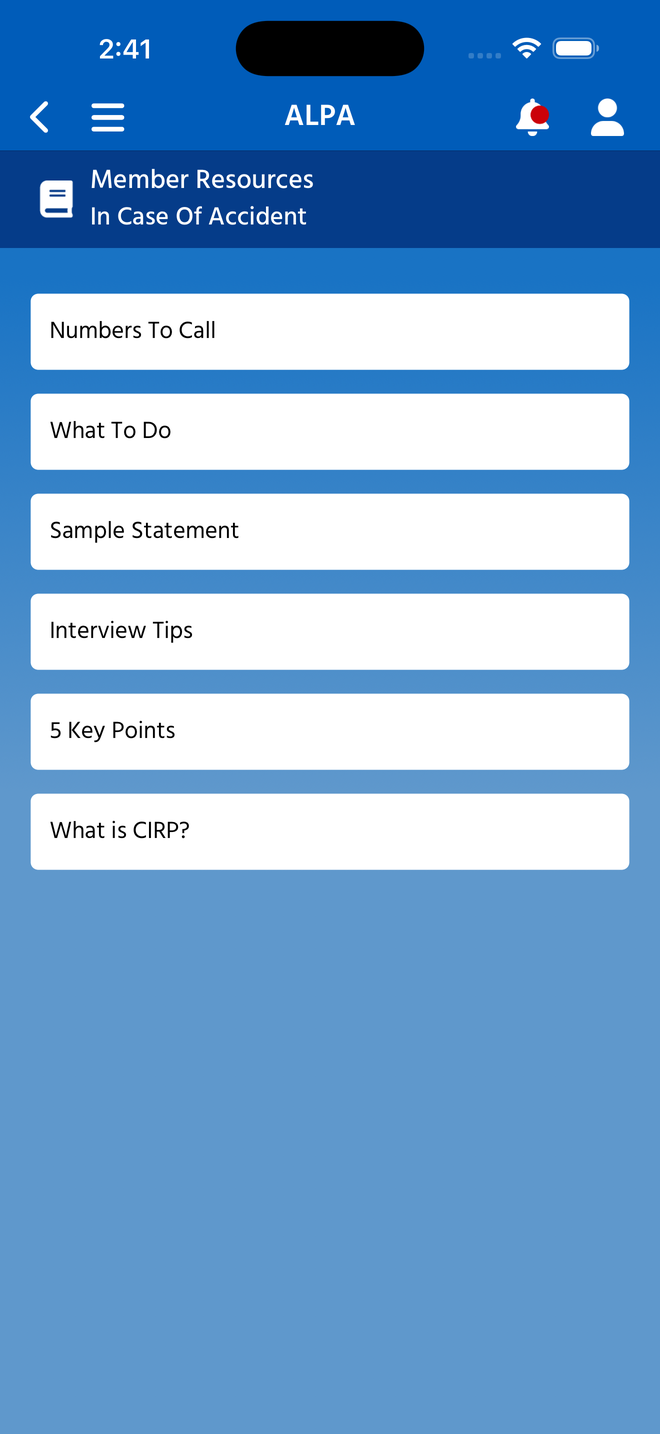
Not a leaf — a second list of six sub-topics (Numbers To Call, What To Do, Sample Statement, Interview Tips, 5 Key Points, What is CIRP?). Building this means a list and its children. Note the label: native says In Case Of Accident, Figma and the Blazor scaffold say In Case of Emergency.
International Directory
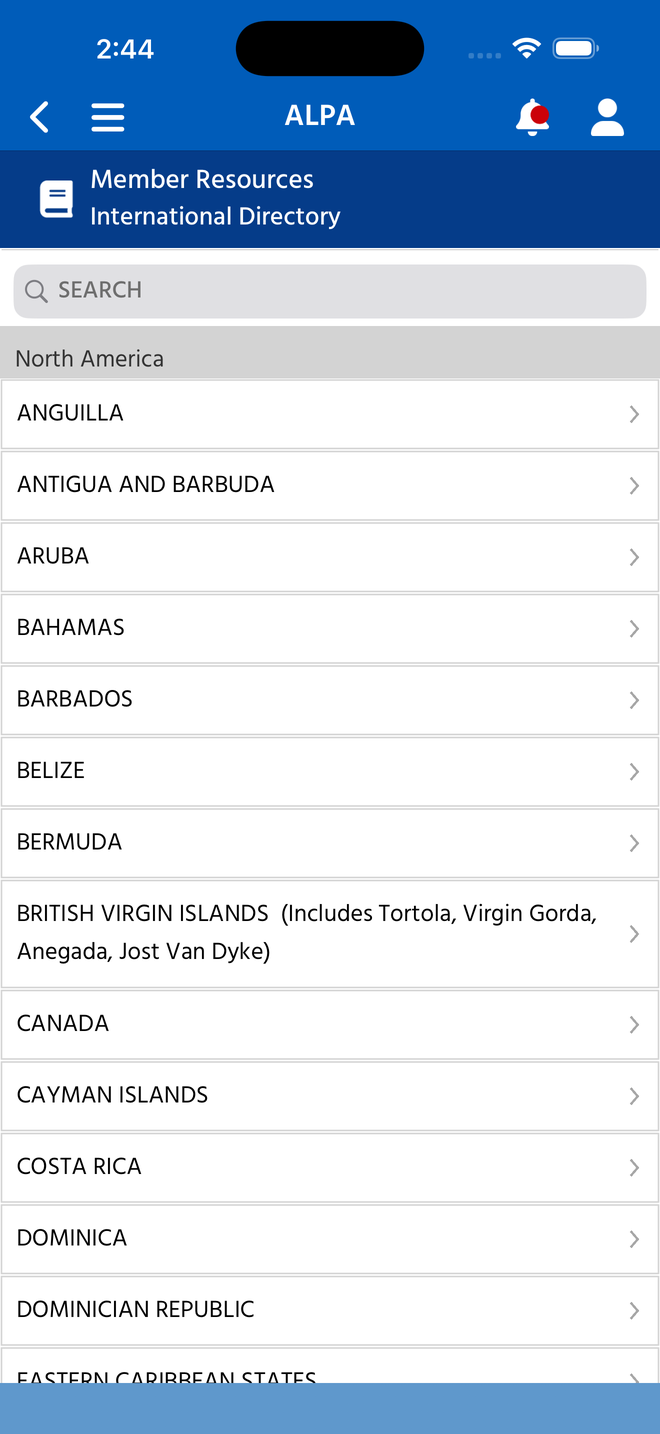
Search field over a grouped, sectioned list (region headers, e.g. North America) with chevron drill-down per country. The most structurally involved of the four.
Membership Card
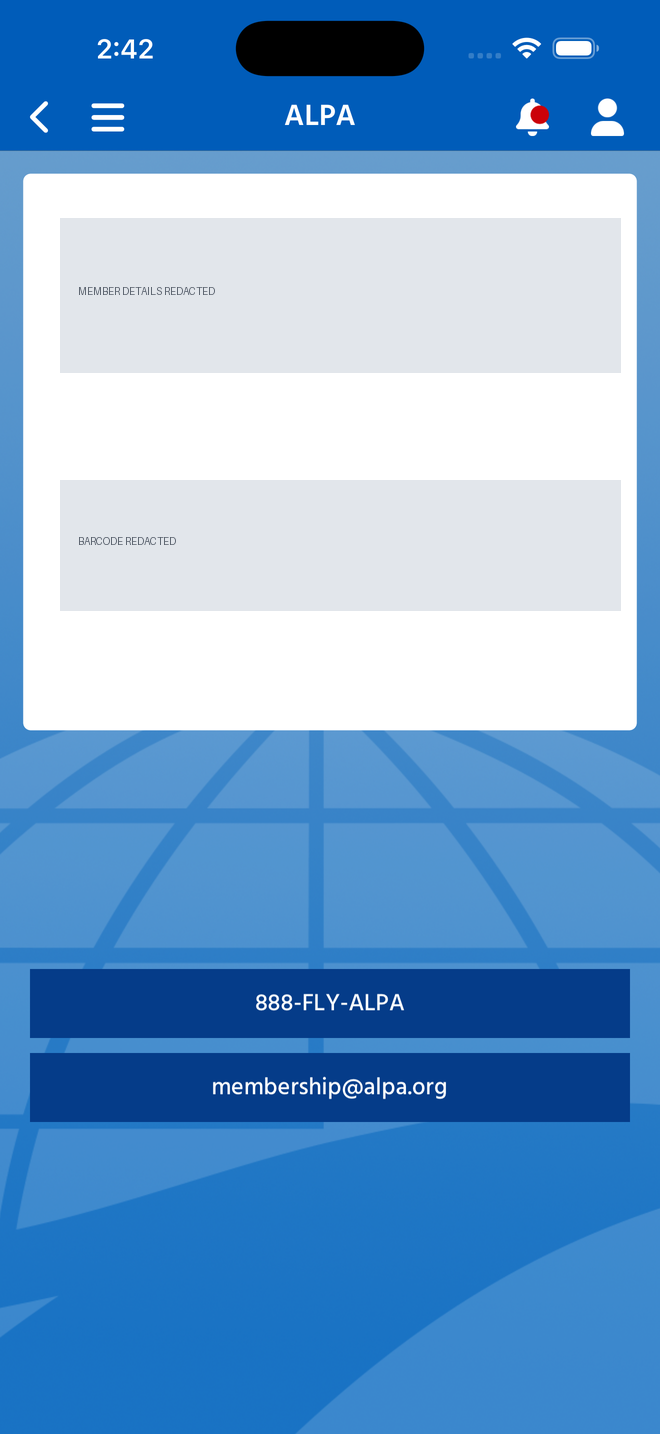
Member details and barcode redacted. Live layout is a white card over the globe artwork carrying name, classification, airline and member number above a scannable barcode, with two contact CTAs beneath. Redacted deliberately — the real screen renders member PII and a scannable credential.
Orange Card
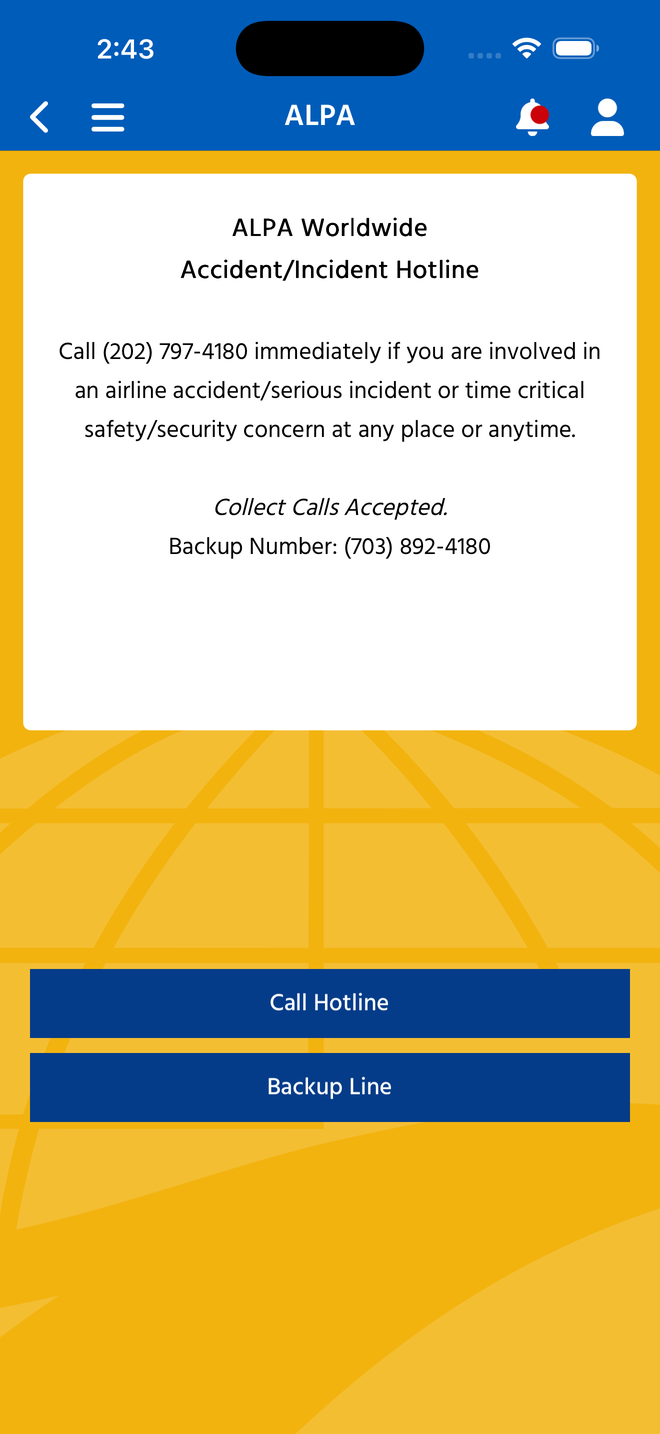
Amber-themed emergency card: hotline copy rendered from HTML, plus Call Hotline and Backup Line CTAs. No member data.
Membership Card carries PII — handle its captures accordingly. The live screen shows a member's name, classification, airline and member number alongside a scannable membership barcode. The capture in this doc is redacted. Any future capture of that screen must be redacted before it is committed or shared, and the same caution applies to the Blazor implementation when it is built.
MEC Committee Details (State 3)
Committee Details
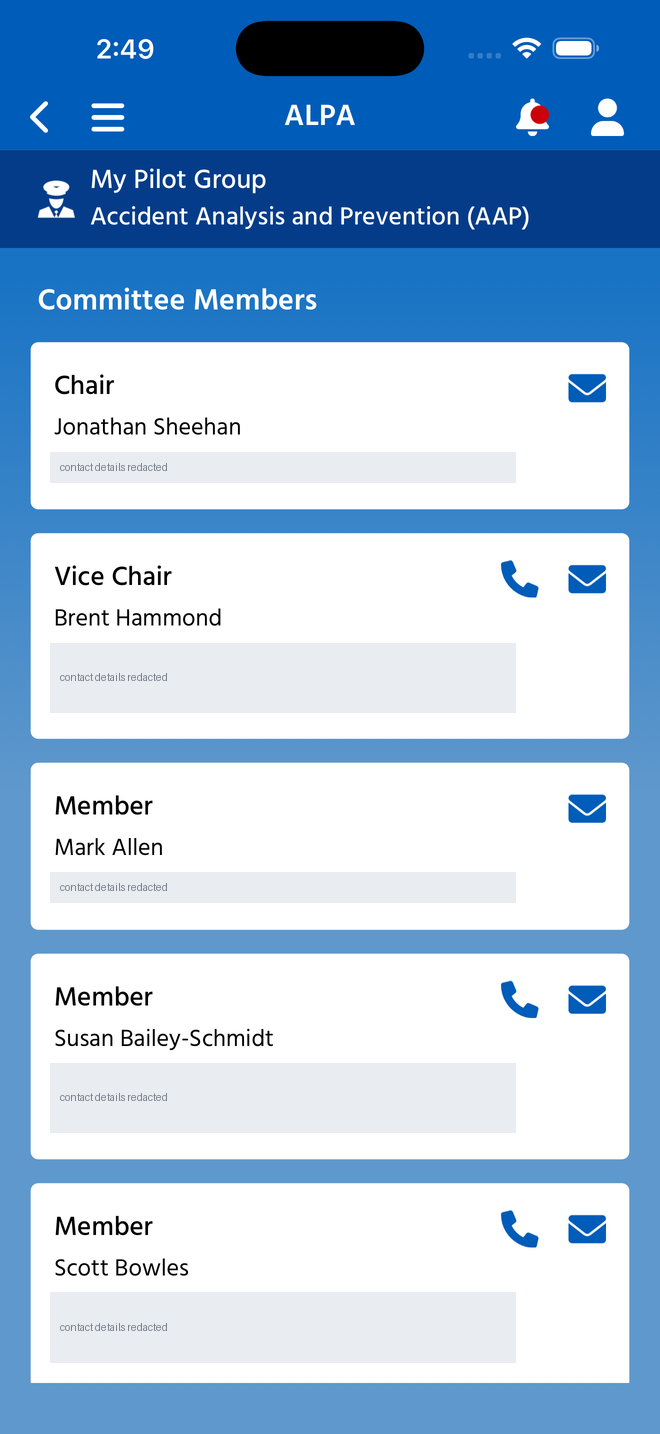
Officer contact details redacted. Reached from My Pilot Group → MEC Committees → a committee. Cards per member with role, name, and direct phone/email, each with mail and call actions. /mec/committees in Blazor is a flat list with no drill-down, so this whole level is missing.
This screen also carries personal data. The live page lists named officers beside direct phone numbers and email addresses. The committed capture redacts the contact lines and keeps roles, names and the action icons so the layout still reads. Apply the same treatment to any future capture, and to the Blazor implementation when it is built.
Contacts — could not be captured
The three Contacts screens (ContactsHomePage,
ContactsCategoryPage, ContactsPage) are route-registered and
reachable in code, but the entry did not render for the account used here. The full My Pilot
Group list came back as: MEC Communications, MEC Documents, MEC Committees, MEC Events, MEC
Reps, Pay Codes, Pilot Dashboard, LEC Documents, LEC Update, LEC Events, LEC Reps.
MEC contacts are API-driven — just by a different API than the menu feed.
MyPilotGroupPageViewModel appends “MEC Contact Info” only when
preferences.Is_MEC_Contact_List_User() is true, and those preferences come from
the member service (memberQueries.GetMemberAsync), not from local settings. Two
neighbours work the same way — “MEC Hotels” behind
Is_MEC_Hotel_List_User() and “MEC Hotel Feedback” behind
Is_Hotel_Form_Active(). So the entry is neither missing nor unpublished; the
account used simply is not flagged for the contact list.
That matters for planning: a screen's presence can be driven by more than one API — the menu feed decides most list contents, while member preferences decide whether some entries appear at all. Neither is visible from a file listing, and either can make a built screen look absent. A Blazor implementation has to honour the same preference checks, or it will show entries to members who are not entitled to them.
How to re-run this audit
Mechanical enumeration first, then read the markup — the enumeration alone will mislead.
| Step | Command / method |
|---|---|
| List native pages | ls ALPAMobile/Pages/*.xaml |
| List Blazor routes | rg '^@page "' --glob '*.razor' |
| Find State 2 (the hard part) | Content search per concept across .razor, then read the file. Look for modals (role="dialog"), expanders (IsExpanded), tab strips, and sections of larger pages. Component comments frequently name the native page they replace — that is the most reliable single signal. |
| Confirm State 3 | Content search must return only incidental hits (e.g. a tile label). A zero-result name search is not sufficient evidence. |