FTDT Duty Period Forms — Design Gap
The gap
No dedicated add- or edit-duty-period screen exists in any of the four known Figma files. The
Design-Source Gap Inventory live-verified
this: search_design_system for “add duty period” surfaces only the
generic card-duty period component and the generic Master Form Field
set — components, not a form screen.
The legacy app has no single add/edit page either: the forms are sub-variants of
FTDTDutyPeriodBasePage, a 500+ line templated base class serving
FTDTAugmentedDutyPeriodPage, FTDTUnAugmentedDutyPeriodPage,
FTDTSplitDutyPeriodPage and the CA variants. Blazor deliberately consolidates
those five variant pages into two routes — /ftdt/add-duty-period and
/ftdt/edit-duty-period — branching on duty-period type inside one form. That
consolidation is itself an undesigned decision: nobody has ruled whether one branching form or
per-variant screens is the intended shape.
A citation discrepancy worth reconciling.
FTDTDutyPeriodForm.razor's own header comment cites
“Figma 4535:14179 — Add Duty Period form” (and
FTDTEditDutyPeriod.razor cites the same node's edit variant), yet the
inventory's live search found no dedicated add- or edit-form screen. Either the node is one
of the generic form-field components the search did surface, or the inventory missed a
frame. One of the two records is wrong; resolving which changes whether this page documents
a design gap or a citation gap.
What ships today
| Aspect | Native (XAML) | Blazor (this build) |
|---|---|---|
| Entry path | FTDTFlightDutyPeriodListPage → FAB + → FTDTOperationTypeSelectionPage → variant page |
FTDT dashboard → /ftdt/select-op-type → /ftdt/add-duty-period |
| Op-type step | Separate page, driven by ?Scope= (US/CA); observed live: navigating it without the query renders an empty list titled “Undefined Operation Selection” |
Separate Blazor page (FTDTSelectOpType.razor), then one form for all types |
| Form | One templated base page, five named variant pages; the US unaugmented path banners “US Unaugmented Duty Period” | One form titled “Add @Vm.TypeLabel Duty Period”: Date, Start Time, Time Zone, segments + acclimated row, computed Max DP/Ends section, violation list, rest-rules inputs — variant-specific inputs branch on the duty-period model type |
| Edit | Same variant pages, pre-populated | /ftdt/edit-duty-period?Id=… loads the duty period from the local store into FTDTDutyPeriodShell, adding CONCLUDE and DELETE actions with confirm-relabel states |
Side by side
Captured 2026-08-12 on an iPhone 17 Pro Max simulator (iOS 26.4), build commit
34737cb4, against live data. Both add flows were opened and backed out of —
nothing was saved on either side.
Add form
Native (XAML, shipped today)
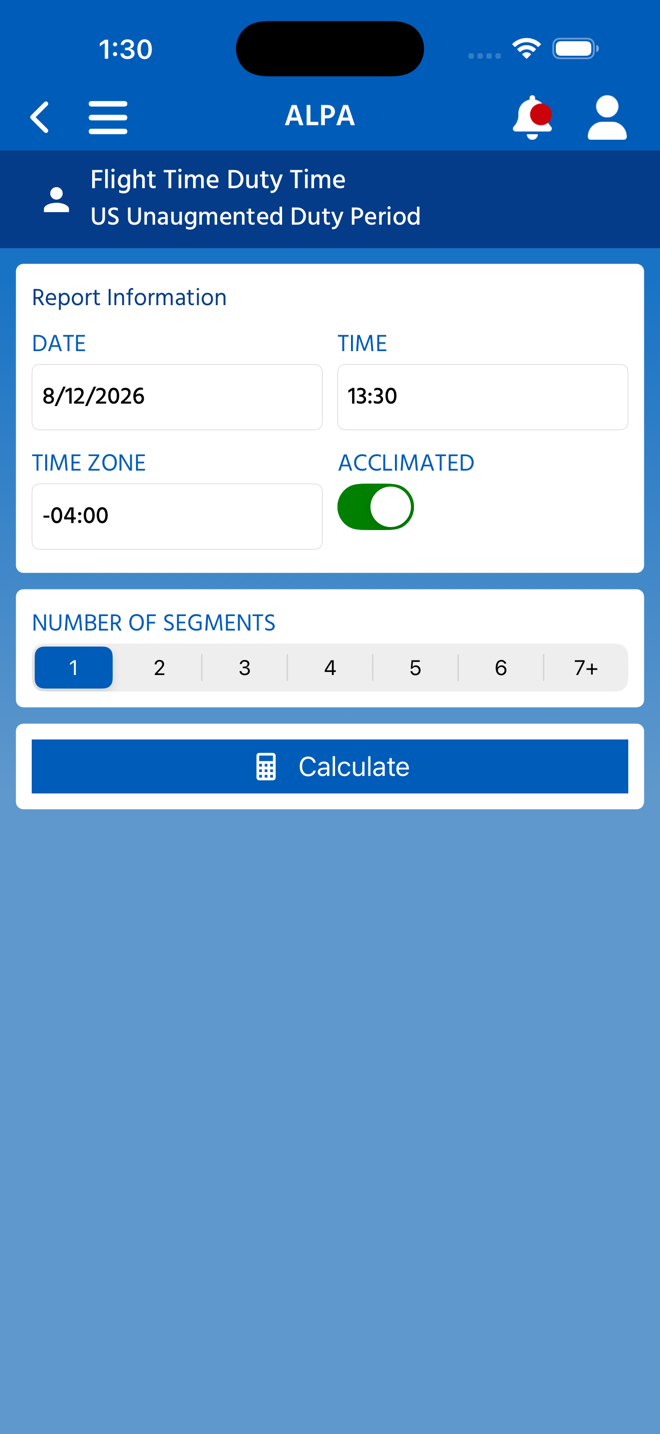
FTDTUnAugmentedDutyPeriodPage — one of five variants
Reached via FTDTFlightDutyPeriodListPage → FAB +
→ op-type selection (?Scope=US) → Unaugmented. Banner reads
“US Unaugmented Duty Period”. The form is a sub-variant of the 500+ line
FTDTDutyPeriodBasePage ControlTemplate.
Blazor (this build, for review)
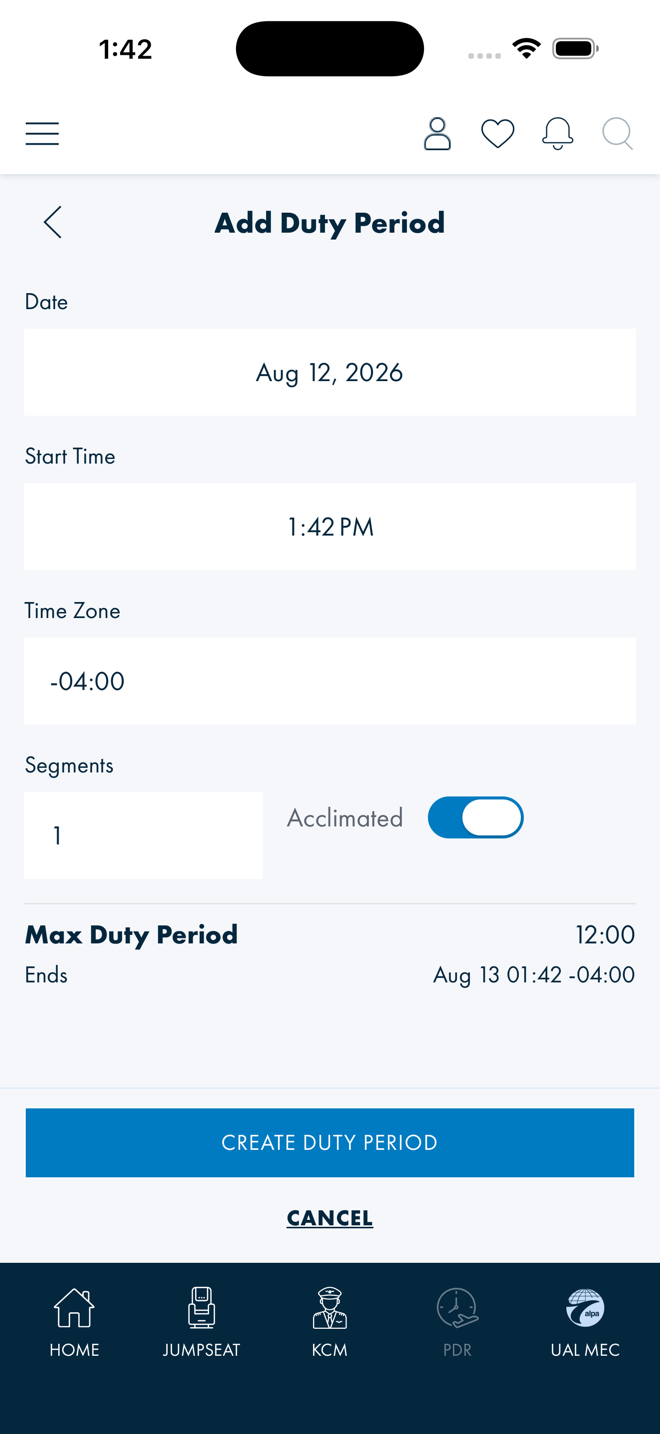
FTDTDutyPeriodForm — one route for all variants Title reads “Add Duty Period” (with the type label when one is set). Date, Start Time and Time Zone fields, then variant-specific inputs, the computed Max DP/Ends section and the violation list — five native pages folded into one form that branches on the duty-period type.
Edit form — capture blocked
No edit-form capture exists, deliberately. The test account has zero duty-period records, and creating one against the live account is forbidden (no test or seed data in real accounts). The edit form cannot be reached with real data until a capture account or simulator with an existing duty period is available — that is the unblocking condition, and it applies to both native and Blazor sides equally.
What was verified live instead: /ftdt/edit-duty-period without a resolvable
id renders its “Edit … Duty Period” title and
FTDTDutyPeriodShell's “Duty period not found.” error
state — the route exists and fails safely, it just has nothing to show. No compare grid is
published for the edit form until a populated capture is possible.
Verification
Walked live on an iPhone 17 Pro Max simulator, build 34737cb4:
The “US Unaugmented Duty Period” banner text is
BannerSubtitle in FTDTUnAugmentedDutyPeriodPageViewModel; the
“Duty period not found.” string is FTDTDutyPeriodShell.razor's
null-duty-period branch — both confirmed in source, not just on screen. The op-type page's
Scope dependency is its [QueryProperty("Scope","Scope")]
declaration; the “Undefined Operation Selection” title was observed live when
navigating without the query.
Open questions
| # | For | Question |
|---|---|---|
| 1 | Design | Is one consolidated form branching on duty-period type (the shipped Blazor shape) the intended design, or should the variants (US/CA, augmented/unaugmented/split) each get their own screen as native does? The consolidation was an engineering call; nobody has ratified it. |
| 2 | Design | Does the add flow keep operation-type selection as its own screen, or fold it into the form as a first field? Natively it is a separate scope-driven page — and one that renders an empty “Undefined Operation Selection” list when the scope is missing, a state no design covers either. |
| 3 | Design | How should computed, non-editable output — the Max DP/Ends section and the violation list — render inside an input form? Today it sits inline between field groups with no designed distinction between what the pilot types and what the calculator returns. |
| 4 | Design | Edit adds destructive actions: DELETE and CONCLUDE, both using a tap-again-to-confirm relabel (“CONFIRM DELETE”). Is inline relabel the right confirmation pattern for destructive actions, or should these be dialogs? |
| 5 | Engineering | Reconcile the Figma 4535:14179 citation in FTDTDutyPeriodForm.razor/FTDTEditDutyPeriod.razor against the gap inventory's finding that no add/edit-form frame exists. One record is wrong; the answer decides whether a design request is needed at all. |
References
ALPAMobile.Presentation/Components/Pages/FTDT/FTDTDutyPeriodForm.razor—/ftdt/add-duty-periodALPAMobile.Presentation/Components/Pages/FTDT/FTDTEditDutyPeriod.razor—/ftdt/edit-duty-periodALPAMobile.Presentation/Components/FTDT/FTDTDutyPeriodShell.razor— shared form shell; the “Duty period not found.” stateALPAMobile.Presentation/Components/Pages/FTDT/FTDTSelectOpType.razor—/ftdt/select-op-typeALPAMobile/Pages/FTDTFlightDutyPeriodListPage.xaml,ALPAMobile/Pages/FTDTOperationTypeSelectionPage.xaml,ALPAMobile/Pages/FTDTDutyPeriodBasePage.xaml,ALPAMobile/Pages/FTDTUnAugmentedDutyPeriodPage.xaml— the native flowALPAMobile/ViewModels/FTDTUnAugmentedDutyPeriodPageViewModel.cs— the “US Unaugmented Duty Period” banner- Design-Source Gap Inventory — the live Figma verification
- FTDT — Blazor UI Migration Plan
- XAML → Blazor Coverage Map — the five-pages-into-one-route consolidation (State 2)