KCM Screen Set — Domain-Control Data-Gap Analysis
Scoping of the Known Crewmember (KCM) screen set to map domain controls to data. Documentation only; no presentation work.
Headline — KCM is data-complete. The two data-bearing screens are already backed by existing
endpoints whose models match the Figma 1:1:
GetKCMAirlineItemsAsync → KCMAirlineItem
(airlineName / pilots / attendants) and GetKCMAirportItemsAsync → KCMAirportItem
(airportName / airportCode / checkinNotes / mapUrl). No backend data gaps. The work here is the
presentation scaffolds (Master Form Field, check, radio, tab group, Underline Button) plus client-side
filter/search — and two small content-source confirms.
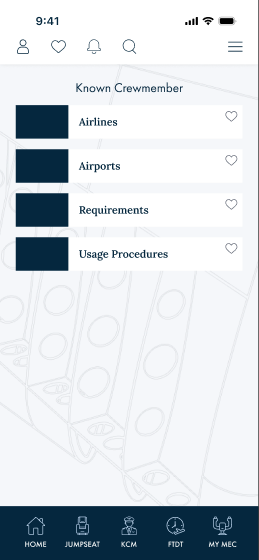
KCM home (4562:7572)
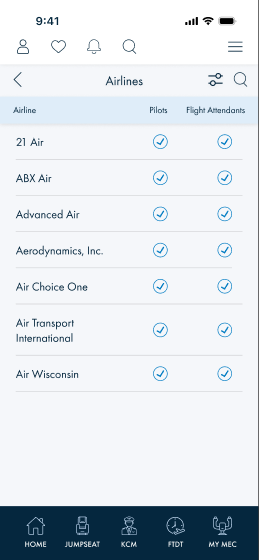
Airlines (4562:7754)
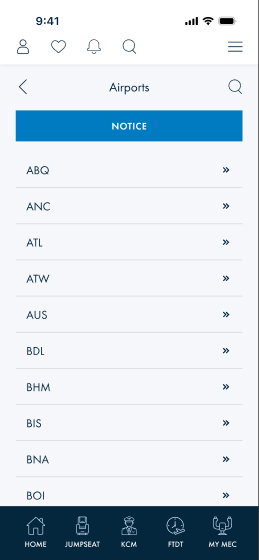
Airports (4562:8249)
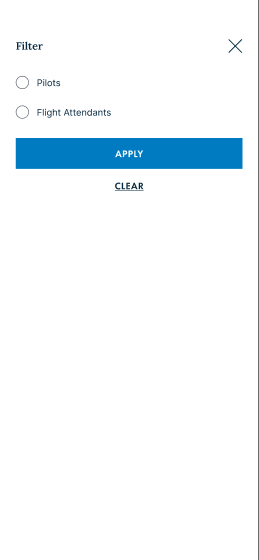
Filter overlay (4562:8545)
1 · Screens & controls
- KCM home — "Known Crewmember" + 4
card-smnav tiles: Airlines · Airports · Requirements · Usage Procedures. - Airlines — header (back · sort/filter · search) + table "Airline / Pilots / Flight Attendants"; rows =
Master Form Field(airline name + twocheckes). - Airports ("Airline Policies" node) — "NOTICE" Primary button + list of airport codes (
Master Form Fieldrows,»→ detail). - Policies search — search
Master Form Field+ list ofMaster Form Fieldrows (client-side search). - Filter overlay —
radio buttons (Pilots / Flight Attendants) +tab group(hidden) + Primary "Apply" + Underline "Clear".
2 · Data-source mapping
| Screen / element | Data needed | Source (exists) | Status | Note |
|---|---|---|---|---|
| KCM home tiles | title + icon + nav target | MenuItem (or static nav) | mapped | Airlines/Airports → data lists; Requirements/Usage Procedures → content (see §3). |
| Airlines row | airline name · pilots ✓ · flight-attendants ✓ | KCMAirlineItem { airlineName, pilots, attendants } · getkcmairlines |
exact | The two check columns map directly to the pilots / attendants booleans. |
| Airports list + detail | code · name · check-in notes · map | KCMAirportItem { airportName, airportCode, checkinNotes, mapUrl } · getkcmairports |
exact | List shows code (» → detail); detail = checkinNotes + mapUrl. |
| Filter (Pilots / FA) | selected filter | client-side state | client | Filters the airlines list by the pilots/attendants flags. No backend. |
| Search | query | client-side over the loaded list | client | No search endpoint needed for these bounded reference lists. |
3 · Confirm items (small)
| # | Item | Question | Status |
|---|---|---|---|
| 1 | Requirements / Usage Procedures tiles | What backs this content — a document/CMS item (DocumentItem) or static in-app content? Not KCM list data. |
confirm |
| 2 | Airports "NOTICE" banner/button | Resolved: the airports list (GetKCMAirportItemsAsync) includes a sentinel item with airportName == "NOTICE"; the client pulls it out and renders its checkinNotes as the notice. Existing behavior — no change. |
resolved |
| 3 | Airline eligibility semantics | Resolved: KCMAirlineItem.pilots / attendants (bools) are the eligibility flags (true = eligible) from GetKCMAirlineItemsAsync. |
resolved |
4 · New scaffold controls (presentation — for the component library, not backend)
| Control | Figma | KCM use |
|---|---|---|
Master Form Field (input_with_icons) | 5236:15830… | Reusable (85 uses). Variants here: table row (label + checks), search input, list row (label + »). |
| check | 5236:15834 | Eligibility indicator (Pilots / FA). |
| radio button | 0:91 / 0:95 | Single-select filter option. |
| tab group | 0:89 | Segmented control (hidden in the filter; present for variants). |
| Underline Button | 0:107 | Text button ("Clear"). |
| nav-control icons | back · i-search · btn-sort&filter · i-close | Header / overlay chrome. |
5 · Summary
- Backend data gaps: none for KCM core data — airlines & airports already map 1:1 to existing endpoints/models.
- Resolved: Airports "NOTICE" (
airportName == "NOTICE"sentinel +checkinNotes) · eligibility (pilots/attendantsbools) · Usage Procedures (bundled PDF + MenuItem). Minor confirm: Requirements tile content source. - Client-side: filter, search, sort.
- Presentation backlog: Master Form Field (+check / radio / tab group / Underline Button) scaffolds.