FTDT — Blazor UI Migration Plan
Implementation roadmap for migrating the remaining FTDT screens from XAML to the Figma-driven Blazor design. Includes per-task status tracking, open questions, and strategy for decomposing the CA duty period monolith.
FTDTDataBase, FTDTDataSyncHelper, FTDTCalculator_USA, FTDTCalculator_CAN).
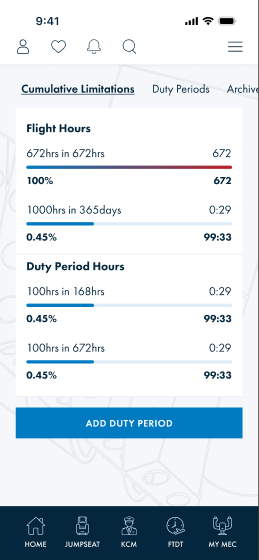
Dashboard with Rest Rules Engine, regulation pill, cumulative bars, and test seeder are done (this session).
The remaining work is exclusively presentation: the duty-period card full interactivity, the three sub-entity forms (flight segment, rest, note), the duty period detail/edit page, augmented-type field additions, and the conclude/restore flows.
1 · Screen inventory
| Screen | Figma | XAML equivalent | Blazor file | Status |
|---|---|---|---|---|
| Dashboard — Cumulative Limitations | 4535:14038 |
FTDTFlightDutyPeriodListPage |
FTDTDashboard.razor |
Done |
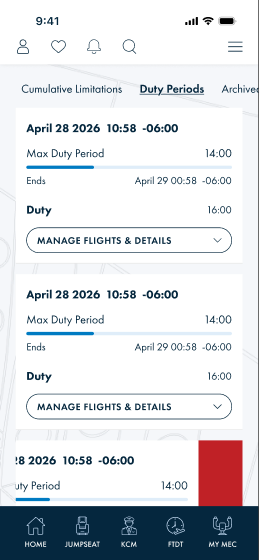
| Dashboard — Duty Periods tab | 4544:5877 |
same list page | FTDTDutyPeriodList.razor + DutyPeriodCard.razor |
Partial |
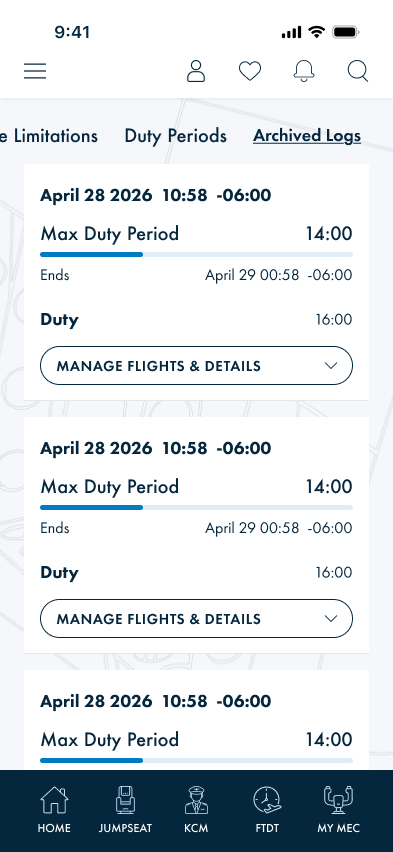
| Dashboard — Archived tab | 4575:9452 |
archive view same page | FTDTDutyPeriodList.razor |
Partial |
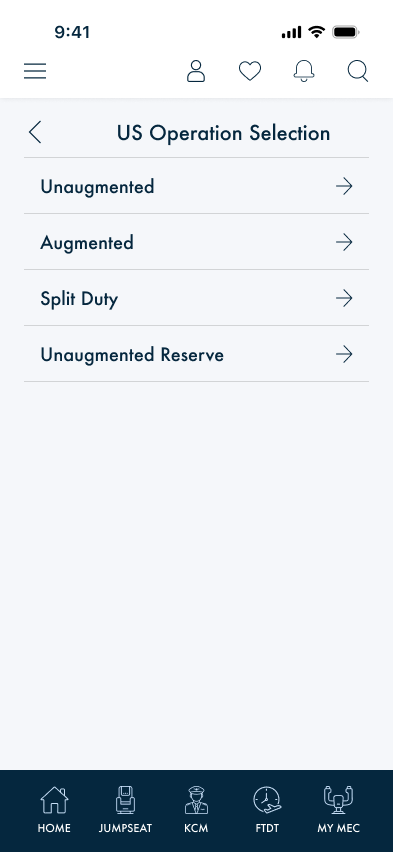
| Select Op Type | 4535:14386 |
FTDTOperationTypeSelectionPage |
FTDTSelectOpType.razor |
Done |
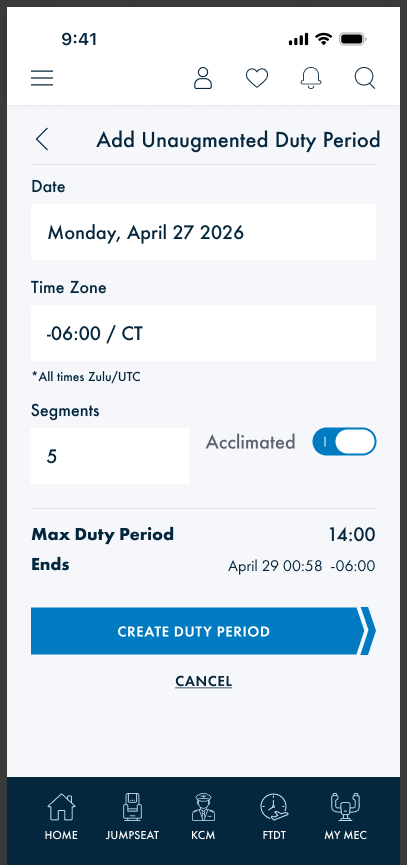
| Add Unaugmented Duty Period | 4535:14179 |
FTDTUnAugmentedDutyPeriodPage |
FTDTDutyPeriodForm.razor |
Partial — CREATE only, no Aug/SD fields |
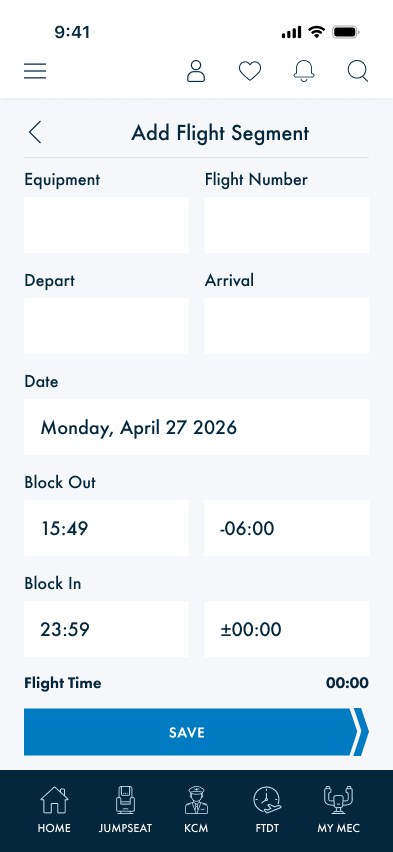
| Add Flight Segment | 4555:6566 |
FTDTDutyDetailsPage |
FTDTAddFlightSegment.razor |
Done |
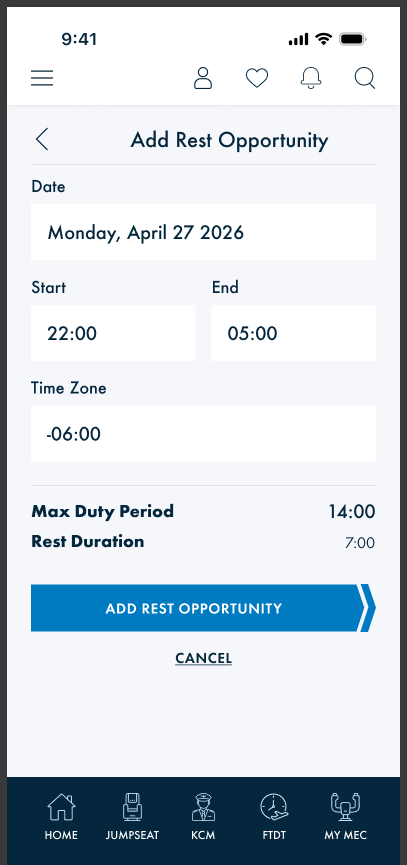
| Add Rest Opportunity | 4603:13187 |
FTDTSplitDutyPeriodPage rest section |
FTDTAddRest.razor |
Done |
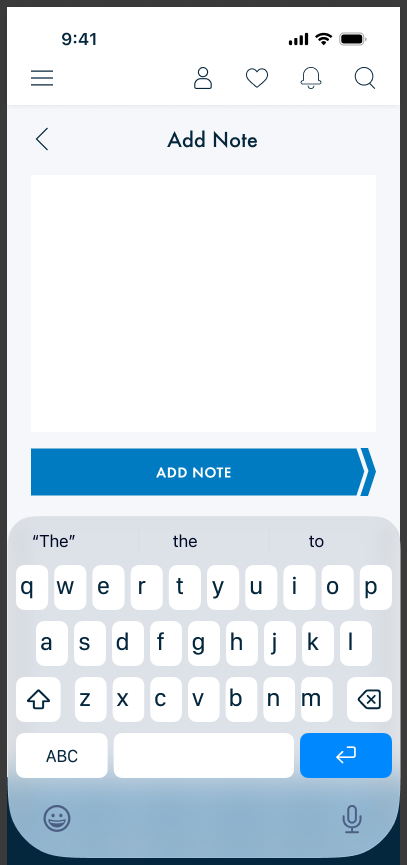
| Add Note | 4603:13348 |
Notes editor in base template | FTDTAddNote.razor |
Done |
| Duty Period Detail / Edit | 4617:13876 (card variants) |
FTDTCADutyPeriodDetailsPage · FTDTDutyPeriodBasePage |
FTDTDutyPeriodShell.razor + FTDTEditDutyPeriod.razor |
Done |
2 · Implementation phases
Phases 2–4 are independent and can proceed in parallel once Phase 1 wiring is in place. Phase 5 depends on Phase 1. Phase 6 extends Phase 5. Phase 7 is last.
DutyPeriodCard.razor · ftdt.css · FTDTDutyPeriodList.razor
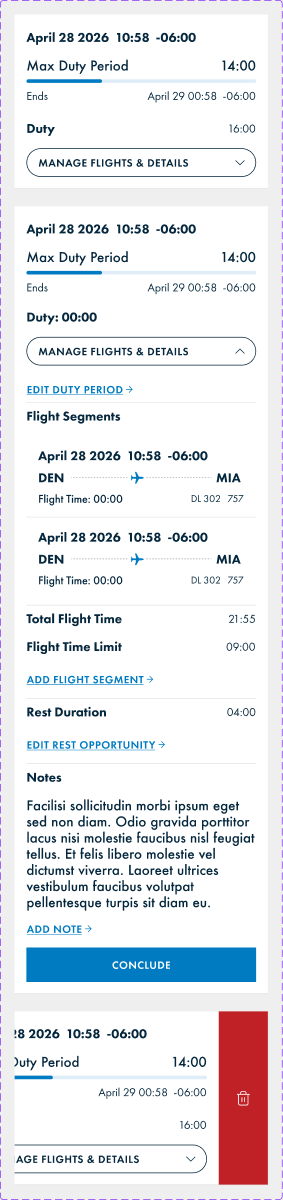
The card is the hub — every subsequent form screen routes from here. The collapsed/expanded/delete variants are fully defined in Figma 4617:13876.
| # | Task | Description | Status |
|---|---|---|---|
| 1.1 | MANAGE button → navigate to detail | Wire the MANAGE FLIGHTS & DETAILS button to navigate to /ftdt/duty-period?id={dp.RecordUUID} instead of inline expand only. Keep inline expand as the visual state; navigation fires on button click. Blocks Phase 5 (detail page must exist first). |
Done |
| 1.2 | Expanded card — missing sections | Add to the expanded state: EDIT DUTY PERIOD → link (/ftdt/edit-duty-period?id=), Total Flight Time + Flight Time Limit rows computed from DutyList, Rest Duration row (from RestOpportunity if present) + EDIT REST OPPORTUNITY → link, Notes text block + ADD NOTE → link, CONCLUDE full-width button. New CSS classes: .ftdt-action-link, .ftdt-dp-sub-section. |
Done |
| 1.3 | Swipe-to-delete strip | Right-swipe reveals red delete strip with trash icon — matching the delete-demo variant in Figma 4617:13876. CSS transform: translateX on touch events; confirm pattern with @ontouchstart/@ontouchend in Blazor. New classes: .ftdt-dp-delete-strip, .ftdt-dp-card-wrapper. → OQ-5 (gesture approach) |
Done |
| 1.4 | Fix inline styles in FTDTDutyPeriodList | FTDTDutyPeriodList.razor lines 12–14 use style= attributes on skeleton divs. Move heights to named CSS classes in ftdt.css. Minor but policy-violating. |
Done |
| 1.5 | Restore action in Archive tab | Cards in the Archived tab need a Restore action (swipe or button) that calls FTDTDataBase un-delete and refreshes the list. XAML uses a Restore swipe item. Figma archive screen does not show restore UI explicitly — match XAML behavior. |
Done |
FTDTAddFlightSegment.razor
Full-screen form matching Figma 4555:6566. XAML equivalent: FTDTDutyDetailsPage (modal). Figma renders as a full page with standard nav bar — target is full-screen. → OQ-2
| # | Task | Description | Status |
|---|---|---|---|
| 2.1 | Route + nav bar | @page "/ftdt/add-flight-segment". Query params: dpId (required), dutyId (optional — omit for new, provide for edit). Back nav → caller. Title: Add Flight Segment / Edit Flight Segment. |
Done |
| 2.2 | Form fields | Two-column row: Equipment + Flight Number. Two-column row: Depart airport + Arrival airport. Full-width: Date, Block Out time + TZ offset (two-column), Block In time + TZ offset (two-column). Computed display: Flight Time (calculated live as Block In − Block Out). Domain: creates/updates FlightSegment in dp.DutyList. |
Done |
| 2.3 | Save + delete actions | SAVE button (primary CTA) → saves segment to DB, navigates back. DELETE text link (edit mode only) → removes segment from dp.DutyList, saves, navigates back. CANCEL text link → no-op navigate back. |
Done |
| 2.4 | US-only: Duty Type selector | XAML FTDTDutyDetailsPage shows a Duty Type segmented control (Flight / Positioning / Duty) only for US scope. CA always creates a FlightSegment. For US, the type determines the concrete subclass (FlightSegment vs Positioning vs Duty). Scope-gate via query param scope. |
Done |
FTDTAddRestOpportunity.razor
Full-screen form matching Figma 4603:13187. XAML equivalent: rest section of FTDTSplitDutyPeriodPage and CA rest rows.
| # | Task | Description | Status |
|---|---|---|---|
| 3.1 | Route + form fields | @page "/ftdt/add-rest". Query param: dpId. Fields: Date, Start time, End time, Time Zone. Computed: Max Duty Period (from parent duty period), Rest Duration (End − Start). Domain: RestOpportunity on duty period. |
Done |
| 3.2 | CTA + navigation | ADD REST OPPORTUNITY primary button → saves, navigates back. CANCEL text link → no-op back. | Done |
FTDTAddNote.razor
Minimal full-screen form matching Figma 4603:13348. Text area + single CTA.
| # | Task | Description | Status |
|---|---|---|---|
| 4.1 | Route + text area | @page "/ftdt/add-note". Query param: dpId, optional noteId (edit mode). Large multi-line textarea fills the content area. Domain: DutyPeriod.Notes (string) or a notes collection — confirm sub-entity shape. → OQ-4 |
Done |
| 4.2 | CTA + navigation | ADD NOTE primary button → saves, navigates back. No CANCEL visible in Figma; add Back nav bar button for escape hatch. | Done |
FTDTDutyPeriodShell.razor · FTDTDutyPeriodDetailPage.razor (route host)
The most complex phase. XAML: FTDTCADutyPeriodDetailsPage (1,437 lines) + FTDTDutyPeriodBasePage (707 lines).
Architecture is resolved in Section 4 — use the RenderFragment shell pattern.
Phase 5 targets the MVP edit form (shared fields + wired navigation); Phase 6 adds op-type-specific sections.
| # | Task | Description | Status |
|---|---|---|---|
| 5.1 | FTDTDutyPeriodShell.razor — shared layout shell | RenderFragment shell component (ContentPresenter equivalent). Renders: nav bar (back + title), shared fields (FTDTCommonInputs), @VariantInputs injection slot, computed section (Max DP + Ends), Save / Delete buttons, Conclude button. Parameters: DutyPeriod, RenderFragment VariantInputs, string Title, EventCallback OnSave, EventCallback OnDelete, EventCallback OnConclude. |
Done |
| 5.2 | Load-vs-create mode in FTDTDutyPeriodForm | Existing FTDTDutyPeriodForm.razor is CREATE-only. Add load mode: if id query param is present, load the existing record from DB and pre-populate fields. Reuse via route /ftdt/edit-duty-period?id=&scope=. Save path calls Update instead of Create. |
Done |
| 5.3 | Wire ViolationList in form | FTDTDutyPeriodForm.razor renders <ViolationList /> without passing Violations (always empty). Wire to _dp.Results.Violations after calculation. Minor fix, high UX impact. |
Done |
| 5.4 | Conclude action | CONCLUDE button in the expanded card (Phase 1.2) and in the detail shell calls a service method that sets DutyPeriod.DPEnd, marks the period as concluded, and saves. Conclude locks editing. → OQ-3 (lock behaviour) |
Done |
| 5.5 | Delete / soft-delete action | Delete button in detail shell → calls FTDTDataBase.SoftDeleteDutyPeriod, moves to archive, navigates back to dashboard. |
Done |
FTDTVariantInputs.razor (unified dispatcher; replaces planned sub-components)
Extends Phase 5 shell with op-type-specific sections. Each variant is a focused Razor component injected as VariantInputs.
| # | Task | Description | Status |
|---|---|---|---|
| 6.1 | CA duty period inputs component | FTDTCADutyPeriodInputs.razor — all CA-specific toggle-gated sections using @if: Reserve/Assignment section, Acclimated, Split Duty + UOC toggles, SPO toggle, Day VFR toggle, Number of Flights stepper + Average Flight Duration, calculation exceptions list, applied + available exemptions. Parameters: DutyPeriod (CA type), EventCallback<DutyPeriod> OnChanged. ~300 lines target. → Section 4 (architecture) |
Done |
| 6.2 | CA Split Duty section sub-component | FTDTCASplitDutySection.razor — rest opportunity date/start/end/TZ rows shown when IsSplitDuty is true. Extracted to keep CA inputs file under 300 lines. ~60 lines target. |
Done |
| 6.3 | CA Augmented section sub-component | FTDTCAAugmentedSection.razor — Average Flight Duration segmented control, Additional Crew Members segmented control, Rest Facility Class segmented control. Shown when op type is Augmented or AugmentedReserve. ~60 lines target. |
Done |
| 6.4 | US Augmented inputs | FTDTUSAugInputs.razor — Augmented crew size and rest class selectors (from USA_AugmentedResourceDictionary.xaml). Injected into shell for US Aug and US AugReserve op types. |
Done |
| 6.5 | US Split Duty rest opportunity section | FTDTUSSplitDutyInputs.razor — rest opportunity date/start/end/TZ/computed duration section (from FTDTSplitDutyPeriodPage.xaml). Injected into shell for US SD op type. |
Done |
ftdt.css
The new form pages (Phases 2–4, 6) introduce a two-column field row pattern not yet in ftdt.css. The existing .ftdt-field / .ftdt-field-label / .ftdt-field-input classes cover single-column fields. These additions are needed before Phases 2–4 are styled.
| # | Task | Description | Status |
|---|---|---|---|
| 7.1 | .ftdt-form-col2 row |
Two-column field row for side-by-side inputs (Equipment + Flight Number, Depart + Arrival, Block Out + Block In). display:grid; grid-template-columns:1fr 1fr; gap:12px. |
Done |
| 7.2 | .ftdt-action-link |
Blue text link with → suffix used throughout the expanded card (EDIT DUTY PERIOD →, ADD FLIGHT SEGMENT →, etc.). Matches Figma's inline navigation links inside card sections. |
Done |
| 7.3 | .ftdt-dp-sub-section |
Divider + section block inside the expanded card for flight total, rest, and notes groups. | Done |
| 7.4 | .ftdt-dp-delete-strip |
Red right-side delete overlay revealed on swipe. Position absolute, right: 0, full card height, trash icon centered. Starts hidden (translateX: 100%), slides in on gesture. | Done |
| 7.5 | Segmented control pill (variants) | The existing .ftdt-scope-pill pattern can be reused for CA Average Flight Duration and Crew segmented controls. Confirm class reuse or create a generic .ftdt-segment-control variant with configurable options count. |
Done |
3 · Open questions
| # | Question | Context | Status |
|---|---|---|---|
| OQ-1 | Duty period detail — MVP scope vs. full CA parity upfront | The CA detail page has ~25 toggle-gated sections (exemptions, calculation exceptions, RAP, SPO, DayVFR, crew segmented controls). Phase 5 targets the shared shell + common fields MVP. Phase 6 adds all CA-specific sections. Should Phase 6 be targeted in the same session as Phase 5, or validated separately? | Open |
| OQ-2 | Add Flight Segment / Rest / Note — full-screen vs. modal | Figma shows these as full-screen pages with a standard back nav bar. XAML used modal pushes. Full-screen is recommended to match the Figma target. Confirm before building Phase 2–4. | Open |
| OQ-3 | Conclude — hard-lock or soft-lock editing | After CONCLUDE, should the duty period become read-only in the UI (fields disabled, no edit route), or just "concluded" as a status flag while still editable? XAML does not show a concluded state in the Blazor UI yet. Figma only shows the CONCLUDE button, not the post-conclude state. | Open |
| OQ-4 | Notes sub-entity shape | The XAML uses a single Notes string editor on the duty period. The Figma "Add Note" screen and the expanded card "Notes" section imply possibly a list of notes (ADD NOTE link visible in expanded card). Confirm whether DutyPeriod stores a single Notes string or a List<Note> sub-entity collection. |
Open |
| OQ-5 | Swipe-to-delete gesture approach in Blazor Hybrid | CSS transform: translateX on @ontouchstart/@ontouchmove/@ontouchend is straightforward but Blazor Hybrid's WebView may not bubble touch events reliably on all iOS scroll contexts. Alternative: native MAUI SwipeView wrapping the BlazorWebView's card area (not available from Blazor side). Third option: a long-press or button-based delete instead of swipe. Needs a prototype test. |
Open |
| OQ-6 | CA Exemptions data source | The CA detail page shows Applied Exemptions (with remove button) and Available Exemptions (with apply button). The XAML binds these to HasEnabledExemptions / HasDisabledExemptions collections on the ViewModel. Confirm the domain model carries exemption state and what service populates the available exemption list. |
Open |
4 · CA monolith decomposition strategy
The problem
The XAML implementation has two layers of complexity to migrate:
- US template system —
FTDTDutyPeriodBasePage.xaml(707 lines) uses aControlTemplatewith aContentPresenterso that US op-type pages (UnAugmented, Augmented, SplitDuty) each inject their variant-specific input section into a shared layout shell. Clean separation. - CA monolith —
FTDTCADutyPeriodDetailsPage.xaml(1,437 lines) puts all CA operation types (UnAugmented, Augmented, SplitDuty, Reserve variants, SPO, DayVFR) into a single file with ~25IsVisible-gated sections. No structural separation.
Blazor ContentPresenter equivalent: RenderFragment
RenderFragment is the direct Blazor equivalent of XAML ContentPresenter. A shell component declares it as a parameter; callers inject their variant markup as child content.
<!-- FTDTDutyPeriodShell.razor — the ContentPresenter equivalent -->
@code {
    [Parameter, EditorRequired] public RenderFragment VariantInputs { get; set; } = default!;
    [Parameter, EditorRequired] public DutyPeriod DutyPeriod { get; set; } = default!;
    [Parameter] public EventCallback OnSave { get; set; }
    [Parameter] public EventCallback OnDelete { get; set; }
    [Parameter] public EventCallback OnConclude { get; set; }
    [Parameter] public string Title { get; set; } = "Duty Period";
}

<div class="ftdt-page">
    <div class="ftdt-nav-controls">
        <button class="ftdt-nav-back" @onclick="GoBack"></button>
        <div class="ftdt-nav-title">@Title</div>
    </div>
    <div class="ftdt-scroll">
        <FTDTCommonInputs DutyPeriod="DutyPeriod" />    <!-- shared: date/TZ/segments/acclimated -->
        @VariantInputs                                      <!-- ContentPresenter slot -->
        <FTDTComputedSection DutyPeriod="DutyPeriod" />   <!-- shared: Max DP + Ends -->
    </div>
    <div class="ftdt-cta">
        <button class="alpa-btn" @onclick="OnSave">SAVE</button>
        <button @onclick="OnConclude">CONCLUDE</button>
    </div>
</div>
A caller page (e.g. /ftdt/duty-period?scope=CA) injects the CA-specific fragment:
<FTDTDutyPeriodShell DutyPeriod="_dp" Title="Duty Period" OnSave="SaveAsync" OnConclude="ConcludeAsync">
    <VariantInputs>
        <FTDTCADutyPeriodInputs DutyPeriod="(DutyPeriod_CAN_UnAugmented)_dp"
                                OnChanged="HandleChanged" />
    </VariantInputs>
</FTDTDutyPeriodShell>
Three options evaluated
| Option | Description | Pros | Cons | Fit |
|---|---|---|---|---|
| A · Single file + @if | One FTDTCADutyPeriodForm.razor with all CA sections gated by @if |
Zero indirection, easy to follow. Matches existing FTDTDutyPeriodForm pattern. |
~700+ line file. All CA op-type logic in one place is hard to maintain as rules evolve. | Acceptable for a quick first pass but creates future debt. |
| B · RenderFragment injection | Shell + per-op-type variant fragment components (FTDTCADutyPeriodInputs, FTDTUSAugInputs, etc.) |
Exact structural mirror of XAML ControlTemplate. Shell stays under 100 lines. Variants are focused files. Matches the US template system 1:1. | Slight indirection (caller wraps in <VariantInputs> child content). CA variant still needs internal @if gates for SPO/DayVFR/etc. |
Best fit for the US side. Good for CA too — isolates the conditional complexity. |
| C · Cascading EditContext | CascadingValue<EditContext> so sub-components read/write the bound model autonomously |
Self-contained sub-components, reusable. | Requires model classes to support INotifyDataErrorInfo / DataAnnotations — not present. Conflicts with existing [Parameter] + EventCallback pattern throughout the project. |
Poor fit. Significant retrofit scope. |
Decision: Hybrid B + A — RenderFragment shell with focused sub-components
RenderFragment shell (Option B) for the US/CA split.
Within each CA variant component, use @if for the many conditional CA sections (Option A per-file).
Extract the two largest CA sub-sections (Split Duty rest + Augmented crew) into their own focused sub-components.
All data sharing uses explicit [Parameter] + EventCallback<T> — consistent with
RestRulesInputs, PositioningInput, and SleepOpportunityInput already in the project.
CascadingValue is not needed — the form tree is only 2–3 levels deep.
Target file structure
├── FTDTDutyPeriodShell.razor ← RenderFragment shell (shared nav + fields + CTA)
├── FTDTCommonInputs.razor ← Shared: date / TZ / segments / acclimated
├── FTDTComputedSection.razor ← Shared: Max DP + Ends computed display
├── FTDTCADutyPeriodInputs.razor ← CA variant: all @if-gated sections (~300 lines)
├── FTDTCASplitDutySection.razor ← CA sub: split duty rest rows (~60 lines)
├── FTDTCAAugmentedSection.razor ← CA sub: Aug crew + rest class (~60 lines)
├── FTDTUSUnaugInputs.razor ← US UnAug variant (small — already in DutyPeriodForm)
├── FTDTUSAugInputs.razor ← US Aug variant
└── FTDTUSSplitDutyInputs.razor ← US SD variant (rest opportunity section)
Components/Pages/FTDT/
├── FTDTDutyPeriodDetailPage.razor ← /ftdt/duty-period?id= (route host, instantiates shell)
├── FTDTAddFlightSegment.razor ← /ftdt/add-flight-segment?dpId=
├── FTDTAddRestOpportunity.razor ← /ftdt/add-rest?dpId=
└── FTDTAddNote.razor ← /ftdt/add-note?dpId=
Data sharing pattern
All components follow the existing project convention — no deviations:
// Every variant and sub-component uses this signature:
[Parameter, EditorRequired] public DutyPeriod_CAN_UnAugmented DutyPeriod { get; set; } = default!;
[Parameter] public EventCallback<DutyPeriod> OnChanged { get; set; }

// Mutation pattern (same as RestRulesInputs, PositioningInput):
private async Task SetAcclimated(bool value)
{
    DutyPeriod.Acclimated = value;
    await OnChanged.InvokeAsync(DutyPeriod);
}