FTDT (Flight Time / Duty Time) — Domain-Control Data-Gap Analysis
Scoping of the FTDT screen set (cumulative-limit dashboard · duty-period list · add/edit forms). Documentation only; no presentation work.
Headline — data & computation complete. FTDT is a mature local-first feature:
DutyPeriod CRUD + sync (Create/Update/SoftDeleteDutyPeriodAsync,
GetDutyPeriodsUpdatedAtAsync → DutyPeriodExpanded, FTDTDataBase +
FTDTDataSyncHelper). Every duration and limit on screen — Max Duty Period, Ends, the cumulative
Flight/Duty-hour bars — is computed client-side by the FAR-117 / Canadian rest calculators
(CalculatorRest_CAN et al.). No backend data gaps. Work is the presentation scaffolds
(Duty Period Card, progress bar & labels, the form fields/toggle/stepper).
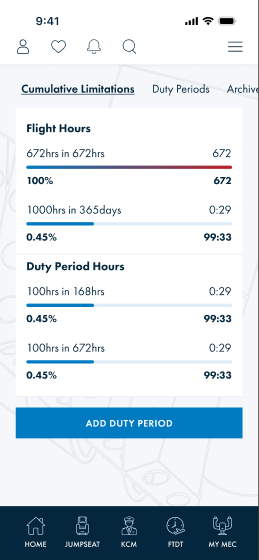
Cumulative limits (25:14038)
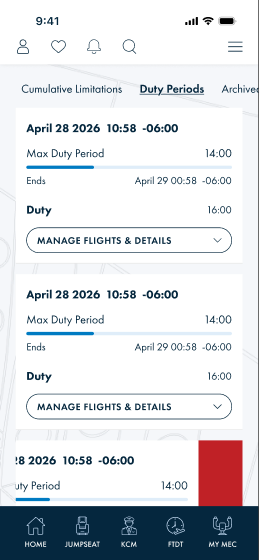
Duty Period cards (4544:5877)
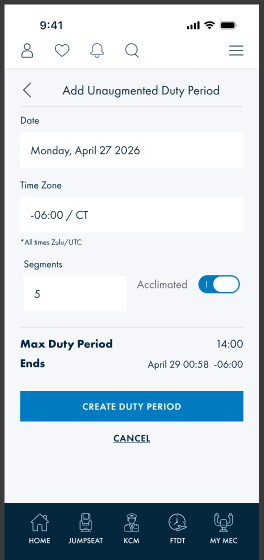
Add duty period (4535:14179)
1 · Screens & controls
- Dashboard (4535:14038) — tabs (Cumulative Limitations · Duty Periods · Archived); cumulative Flight Hours & Duty Period Hours as
progress bar & labels(used/limit · % · remaining) + Add Duty Period. - Duty Periods (4544:5877) — list of
card-duty period-alt(Duty Period Card): start datetime+offset · Max Duty Period (progress) · Ends · Duty hours · "Manage Flights & Details"; swipe → delete. - Archived (4575:9452) — same card, soft-deleted periods (
Deletedflag). - Select op type (4535:14386) — choose
DPOperationType(UnAug/Aug ± rest · single-duty · US/Canada). - Add unaugmented / segment / rest / note (4535:14179 · 4555:6566 · 4603:13187 · 4603:13348) — forms:
Master Form Field+toggle-settings(Acclimated) + computed Max Duty Period/Ends + Create/Cancel.
2 · Duty Period Card — data shape
- Start datetime + UTC offset —
DutyPeriod.DPStart - Max Duty Period (e.g. 14:00) + progress — computed from OperationType · segments · acclimation
- Ends (datetime + offset) —
DutyPeriod.DPEnd(computed) - Duty hours — computed
- Operation type —
DutyPeriod.OperationType(DPOperationType); author/source —CreatedBy/DataSourcedFrom - "Manage Flights & Details" → segments/rest/notes (sub-entities of the expanded period)
3 · Data-source mapping
| Element | Data | Source (exists) | Status |
|---|---|---|---|
| Duty period list / archived | periods (+ deleted) | GetDutyPeriodsUpdatedAtAsync → DutyPeriodExpanded; local FTDTDataBase | mapped |
| Add / edit / delete period | date · timezone · op type · segments · acclimated | Create/Update/SoftDeleteDutyPeriodAsync → DutyPeriod | mapped |
| Op-type selection | operation type | DPOperationType enum (US + Canada) | mapped |
| Max Duty Period / Ends / Duty | computed durations | client-side FAR-117 / CAN calculators (CalculatorRest_CAN) | client-calc |
| Cumulative Flight/Duty hour bars | used vs regulatory window · % · remaining | client-side aggregation of logged periods vs limit rules | client-calc |
| Sync | create/update/delete reconciliation | FTDTDataSyncHelper (Version, SyncStatus, RemoteId) | mapped |
4 · Confirm items
| # | Item | Question |
|---|---|---|
| 1 | Regulatory limit rules (FAR-117 windows, Canadian rest) | RESOLVED — all client-side calculators (FAR-117 / Canadian rest, CalculatorRest_CAN et al.); no backend rule config. Backend only persists/syncs DutyPeriod. |
| 2 | Sub-entities (flight segments · rest · notes) | Confirm the duty-period model (or DutyPeriodExpanded) carries the segment/rest/note collections backing the add screens. |
| 3 | Acclimated / segments inputs | Confirm these calc inputs persist on DutyPeriod. |
4a · Background implementation
Interior-page background — correct pattern (verified 2026-06-26).
The FTDT interior screen (
4535:14038) uses bg-main (#f5f7fa) as the base background color for the content area,
with a faint watermark image overlaid at mix-blend-multiply + object-cover.
The navBar-bottom uses Surface/Brand (#05273e, dark navy) — the only element where dark navy is a background.
- DO:
background: var(--bg-main, #f5f7fa)on the page container. Overlay the watermark image withmix-blend-multiply. - DO NOT: use
Surface/Brand(#05273e) as an interior-page background — it is the dark navy reserved for the bottom nav bar only. - Text color throughout:
Text/Primary(#05273e) — dark navy as text (foreground), not background. - Card surfaces:
Surface/Default(white).
5 · New scaffold controls (presentation)
| Control | Note |
|---|---|
| card-duty period-alt (Duty Period Card, new) | Period summary + progress + manage/expand + swipe-delete. |
| progress bar & labels (new) | Used/limit · % · remaining — dashboard cumulative bars + per-card Max Duty Period. |
| Master Form Field | Date / time-zone / segment / numeric inputs (shared control). |
| toggle-settings | Acclimated (and other boolean inputs). |
| btn-flight finder interior nav | Tab nav (Cumulative · Duty Periods · Archived). |
6 · Summary
- Backend data gaps: none — DutyPeriod CRUD + sync and op-type enum already back every screen.
- Client-side: all durations/limits are computed by the FAR-117 / Canadian rest calculators; cumulative bars aggregate locally.
- Confirm: sub-entity collections (segments/rest/notes) · calc-input persistence. (Regulatory limit rules resolved: all client-side calculators — see #1.)
- Presentation backlog: Duty Period Card · progress bar & labels · Master Form Field · toggle-settings · tab nav.